Our Community is in read-only mode until April 8th, learn more here. You can still search existing threads or get help via Dropbox Support, the Dropbox Help Center, or Learn.
Forum Discussion

willy999
1 year agoNew member | Level 2
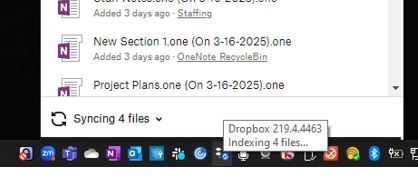
Dropbox icon constantly reports "Indexing 4 files..."
I deleted all files in my personal Dropbox account, then moved a couple gigs of files into it from my work Dropbox account. It took a little while to move the files but has been completed for a coupl...

rickvines
11 months agoExplorer | Level 3
There are no sync error, and the number started at 84,000, and has sat at 9,829 for 24 hours so far. I just re-installed Dropbox, so it is the latest version.
- Nancy11 months ago
Dropbox Community Moderator
Can you also do an advanced reinstall and let me know if you see any difference?
- rickvines11 months agoExplorer | Level 3
I can try that, but since this will be my 4th reinstall, I'd just like to understand why you think this might make a difference. Thank you
- Megan11 months ago
Hey rickvines let me also jump in here!
The advanced reinstall is essentially is a step beyond a basic reinstall you can take.
It can help remove any older, saved settings from a previous install of our app, and start fresh. Have you tried this during your troubleshooting?


About Create, Upload, and Share
Find help to solve issues with creating, uploading, and sharing files and folders with Dropbox.
The Dropbox Community team is active from Monday to Friday. We try to respond to you as soon as we can, usually within 2 hours.
If you need more help you can view your support options (expected response time for an email or ticket is 24 hours), or contact us on X, Facebook or Instagram.
For more info on available support options for your Dropbox plan, see this article.
If you found the answer to your question in this Community thread, please 'like' the post to say thanks and to let us know it was useful!


