We're making some changes to the Dropbox Community 👩💻 - Find out more here.
Forum Discussion

coymeetsworld
6 years agoHelpful | Level 6
Dropbox is continuously reporting it's syncing, or indexing on Windows 10.
Hello,
Despite not making any changes to my Dropbox folder contents on my Windows host the Dropbox icon is at a constant syncing and/or indexing state and I cannot tell what it is actually trying to do. I've had this issue for weeks, I've had to even shut down Dropbox at times because it was using a high amount of CPU cycles.
I've updated to latest version 86.4.146 and I still have the problem. I do not have this issue on my Ubuntu box at home. Is there a way to tell what Dropbox is actually doing? I just get a vague statement it says it's "Syncing..." or "Indexing one file", but can't tell what it is syncing or indexing.
Several documents were showing up in the Windows File Explorer, but had a gray x icon on it. I right clicked on all of them and selected Smart Sync->Local. They downloaded (changing the icon to green checkmark), and then then the sync icon on the Dropbox icon in the status bar went away. I'm not sure why I needed to do manually select Smart Sync for each individual file when I'm using Selective Sync and specified that folder, but that appears to have stopped the continous syncing for me at least for now.
45 Replies
Replies have been turned off for this discussion
- Daphne6 years ago
Dropbox Community Moderator
Hey coymeetsworld, thanks for reaching out here!
There could be a few reasons causing this issue. Could you try the following and let me know if it does the trick:
- Click the Dropbox icon in your system tray.
- Click the profile pic/initials icon in the top right of the window.
- Choose "Preferences..."
- Go to the "Account" tab.
- While holding the *
Space bar"Alt+H" keys, click "Fix Hardlinks".
If this doesn't resolve the issue, please follow the steps again and instead click "Fix permissions". The app might need to sync for a while after doing this, so please just keep an eye out for any progress.
Let me know how it goes - thanks!
*EDITED - amended the steps due to changes in the app.
- coymeetsworld6 years agoHelpful | Level 6
Thank you for the quick reply Daphne!
I tried both Fixing hardlink and permissions and I'm still seeing the sync icon over my Dropbox icon.
When clicking on the icon and opening up the panel, on the bottom the status oscillates between Syncing... and Syncing ""
Any thoughts on that? It's says it's syncing an empty string.
- Daphne6 years ago
Thanks for getting back to me here coymeetsworld!
After fixing the permissions and hardlinks, it may need a little time just to catch up so it would be normal to see the status fluctuate a bit.
However, let's have a look at some other possibilities in the meantime.
Do you possibly have any symlinks within your Dropbox folder pointing outwards? You can check this with the steps outlined in point 7 here.
Also, can you let me know around how many files are within your local Dropbox folder? You can right click the Dropbox folder and choose "Properties..." to see this.
Let me know what you find!
- coymeetsworld6 years agoHelpful | Level 6
Several documents were showing up in the Windows File Explorer, but had a gray x icon on it. I right clicked on all of them and selected Smart Sync->Local. They downloaded (changing the icon to green checkmark), and then then the sync icon on the Dropbox icon in the status bar went away. I'm not sure why I needed to do manually select Smart Sync for each individual file when I'm using Selective Sync and specified that folder, but that appears to have stopped the continous syncing for me at least for now.
- Daphne6 years ago
I'm glad to hear that the issue was resolved!
Thanks for taking the time to update me here with this too, as I'm sure this would be helpful for others who might be having the same issue.
I'll admit, it does sound a little strange that this is what resolved this, as having "online only" files with Smart Sync shouldn't cause the app to show as syncing.
If the issue does crop up again, please feel free to get back to me here.
I hope you have a great day!
- Chillosoph6 years agoExplorer | Level 3
hi,
the syncing on 1 of my PCs hasn't worked since the last update.
It's just stuck at syncen the files, it shows how many and the speed (0kbps).
I tried to install it again, tried a different user on the same PC.
When i download the files into the dropbox folder the app notice that and count the files to dowload down and marks them with a green check mark.When i install it on a second and third PC it works just fine.
All PCs are in the same Domain, with the same VirusProtection and behind the same Firewall with the same rights and all run Windows 10 1909.I have done everything i found online and in the help section (uninstalled, unbind, uninstalled virus protection, ...)
I just have no more ideas what to do
- Daphne6 years ago
Hey Chillosoph, I hope you're having a good day so far!
I've merged your post here as you described a similar issue. Can you please take a look at my first post here and let me know if this does the trick?
Let me know - thanks!
- Chillosoph6 years agoExplorer | Level 3
Hi Daphne,
I don't have the Option described.
All i can do is unlink the Account(image link is broken, can not be displayed)
- Daphne6 years ago
Thanks for getting back to me Chillosoph!
Can you just try clicking anywhere on this window and then try holding the Space bar key again to see if the options appear then?
You'll need to keep the Space bar pressed to see and click the option.
Keep me posted!
- Chillosoph6 years agoExplorer | Level 3
Yes i had to click anywhere in the box and the tab spacebar once, if i held the key it would switch between visible and invisible.
But the 2 Fixes didn't change the Problem.
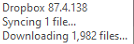
All i get is this window when I over the icon, and nothing changes even after hours.

About Create, Upload, and Share
Find help to solve issues with creating, uploading, and sharing files and folders with Dropbox.
The Dropbox Community team is active from Monday to Friday. We try to respond to you as soon as we can, usually within 2 hours.
If you need more help you can view your support options (expected response time for an email or ticket is 24 hours), or contact us on X, Facebook or Instagram.
For more info on available support options for your Dropbox plan, see this article.
If you found the answer to your question in this Community thread, please 'like' the post to say thanks and to let us know it was useful!


