Your workflow is unique 👨💻 - tell us how you use Dropbox here.
Forum Discussion

Wietse V.
7 years agoHelpful | Level 5
Dropbox keeps (re)indexing and syncing after activating smart sync
I've recently activated the smart sync functionality for my teams account. When I did, Dropbox started indexing and syncing a huge number of files which made sense to me because it needed to download...
 7 years ago
Hi Minato,
Thanks for your reply. I decided to reinstall the Dropbox desktop application yesterday. After I did, I waited another couple of hours for a full sync, but once that was done the issue seems to have disappeared. The Dropbox app now reports that it's fully up to date and seems to stay that way (except for normal syncing behaviour when a file is changed).
I propose I wait to see if the problem reoccurs, and if it does I will create a ticket at the support page as per your suggestion.
Kind regards, Wietse

sidejo
6 years agoNew member | Level 2
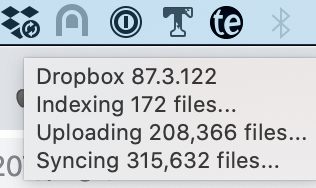
I have the same issue since updating to Catalina. Shows syncing 320k, uploading 208k with no real changes on my end.
I'm pretty sure I don't have that many files there in Selective Sync.

Lusil Dropbox Staff
6 years agoDropbox StaffHey sidejo, thanks for the screenshot! Definitely helps me understand what you're seeing.
In general, if you have a lot of files in your Dropbox folder, it's recommended that you selectively sync folders to help improve the performance of the desktop app.
Also, I can see from your screenshot that you have the beta version (xx.3.xx) installed. Could you try installing the stable version (xx.4.xx), to see if that helps, by:
- Going to your General tab.
- Unchecking the option to Include me in early releases.
- Downloading and installing the latest version.
Let me know how it goes!
About Create, Upload, and Share
Find help to solve issues with creating, uploading, and sharing files and folders with Dropbox.
The Dropbox Community team is active from Monday to Friday. We try to respond to you as soon as we can, usually within 2 hours.
If you need more help you can view your support options (expected response time for an email or ticket is 24 hours), or contact us on X, Facebook or Instagram.
For more info on available support options for your Dropbox plan, see this article.
If you found the answer to your question in this Community thread, please 'like' the post to say thanks and to let us know it was useful!


