We're making some changes to the Dropbox Community 👩💻 - Find out more here.
Forum Discussion

Dennis_Zuiderlicht
2 years agoHelpful | Level 6
Dropbox syncing takes forever sometimes. And sync check-marks keep disappearing.
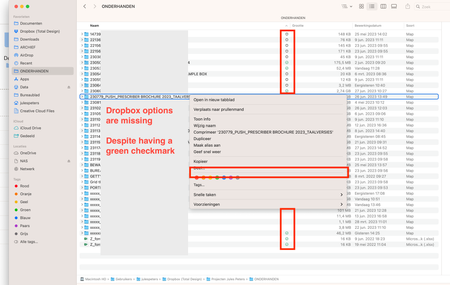
We have issues with our company Dropbox, where checkmarks/cloud sync icons sometimes disappear and reappear.
Also, the right mouse click options (online-only, share, make available offline, etc.) ...
- 2 years ago
Hi Dennis_Zuiderlicht, do you have over 300k files in your Dropbox folder on your machine, regardless if they're available offline or online-only?


Megan Dropbox Community Moderator
2 years agoDropbox Community ModeratorThank you, Dennis!
Keep an eye out, and if you notice any inconsistencies make sure to let us know, and we'll happily look closely into this.

Dennis_Zuiderlicht
2 years agoHelpful | Level 6
Hi Megan and Jay, turning off millions of files that were synced to my Mac made a day and night difference. Even while Dropbox is still busy with lots of stuff in the background, everything works as I'd expect. My colleague did the same test with me also has the same experience that everything works much better now.
Thanks, both of you for your help.
- Megan2 years ago
This is what we like to hear -or read in our case- Dennis_Zuiderlicht!
If you need anything else, we'll be one post away. 😎
 matjazz2 years agoExplorer | Level 3
Hey hey!
I have exactly the same problem as you have described. I was wondering how do you un sync and if that effect anything?
All the best,
Matjaz
- matjazz2 years agoExplorer | Level 3
This is my Dropbox version and bandwidth is not limited.
MacOs Monterey 12.6.5.

About Create, Upload, and Share
Find help to solve issues with creating, uploading, and sharing files and folders with Dropbox.
The Dropbox Community team is active from Monday to Friday. We try to respond to you as soon as we can, usually within 2 hours.
If you need more help you can view your support options (expected response time for an email or ticket is 24 hours), or contact us on X, Facebook or Instagram.
For more info on available support options for your Dropbox plan, see this article.
If you found the answer to your question in this Community thread, please 'like' the post to say thanks and to let us know it was useful!


