Our Community is in read-only mode until April 8th, learn more here. You can still search existing threads or get help via Dropbox Support, the Dropbox Help Center, or Learn.
Forum Discussion

serenke3
10 months agoExplorer | Level 3
Freezing and endless uploading and downloading of files on Windows.
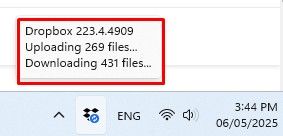
Freezing and endless uploading and downloading of files. Restarting the program does not help, rebooting the PC does not help either. I use the 15Tb tariff, but in response I get a non-working servic...

serenke3
10 months agoExplorer | Level 3
1 time I reinstalled, but problem remaining. Files have correct names. Its happening with random folders. And for example I remove these folders from my PC, but these files remain in the web version and on other computers
- Megan10 months ago
Dropbox Community Moderator
Hey serenke3, thanks for the info!
Do you have any proxy, VPN, firewall, security software, or even ISP/router settings that could be restricting traffic to the following Dropbox domains?
Can you check if the Dropbox bandwidth settings have any limits set?
Also, if you open your Dropbox folder, can you locate the folders/files that seem to be syncing? If so, could you temporarily move them out of your Dropbox folder, and back in?

About Create, Upload, and Share
Find help to solve issues with creating, uploading, and sharing files and folders with Dropbox.
The Dropbox Community team is active from Monday to Friday. We try to respond to you as soon as we can, usually within 2 hours.
If you need more help you can view your support options (expected response time for an email or ticket is 24 hours), or contact us on X, Facebook or Instagram.
For more info on available support options for your Dropbox plan, see this article.
If you found the answer to your question in this Community thread, please 'like' the post to say thanks and to let us know it was useful!


