Our Community is in read-only mode until April 8th, learn more here. You can still search existing threads or get help via Dropbox Support, the Dropbox Help Center, or Learn.
Forum Discussion

serenke3
10 months agoExplorer | Level 3
Freezing and endless uploading and downloading of files on Windows.
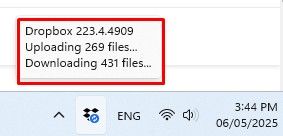
Freezing and endless uploading and downloading of files. Restarting the program does not help, rebooting the PC does not help either. I use the 15Tb tariff, but in response I get a non-working servic...

Megan Dropbox Community Moderator
10 months agoDropbox Community ModeratorHey serenke3, what is the exact OS you're using? If I'm not mistaken it looks like you're on Windows 11, correct?
Can you please locate your Dropbox folder, right click on it and check its properties? I'd like to see approximately how many files you have locally.
One more thing: if you add a file inside your Dropbox folder, does it sync to your account online, or not?

serenke3
10 months agoExplorer | Level 3
If honestly I dint understand clear, which propites I should show?
- Megan10 months ago
Hey serenke3, no worries, I was asking for the properties of your Dropbox folder, but it looks like you were able to send me a screenshot.
If you click "view sync issues" do you see any reports there?
If not, then can I send you an email, in order for us to have a closer look into this?

About Create, Upload, and Share
Find help to solve issues with creating, uploading, and sharing files and folders with Dropbox.
The Dropbox Community team is active from Monday to Friday. We try to respond to you as soon as we can, usually within 2 hours.
If you need more help you can view your support options (expected response time for an email or ticket is 24 hours), or contact us on X, Facebook or Instagram.
For more info on available support options for your Dropbox plan, see this article.
If you found the answer to your question in this Community thread, please 'like' the post to say thanks and to let us know it was useful!


