Our Community is in read-only mode until April 8th, learn more here. You can still search existing threads or get help via Dropbox Support, the Dropbox Help Center, or Learn.
Forum Discussion

NG3
7 years agoNew member | Level 2
How can I clear notifications
i need to know how to clear the notification panel. i got sum notification which i need to clear from panel. pls help

Walter Dropbox Community Moderator
7 years agoDropbox Community ModeratorThank you for your feedback on this one Ian - much appreciated. I'll be passing it on to our developers for future improvements.
In the meantime, note that you can disable or enable notifications on the Dropbox desktop application by following these steps:
1) Click on the small Dropbox icon in your menu bar
2) Click on the gray colored gear icon
3) Select "Preferences..."
4) Toggle the boxes of the notifications you'd like to enable or disable.
[To remove specific notifications you already have in the notifications panel of the Dropbox desktop application, you can click the three dots at the upper right corner of the notification you'd like to remove, and then click remove.]
I hope this helps and please let me know if you have any more feedback or questions ianstudio!
amiryosef
6 years agoExplorer | Level 4
There are no three dots showing up on the notification. see screenshot.
Can you please help me.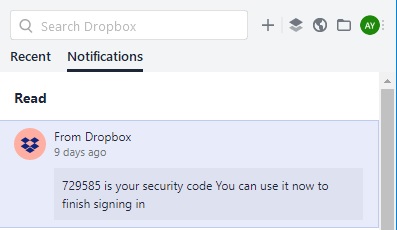
 Rick_M6 years agoExperienced | Level 13
Changes were made that dropped the dots. We have to keep lobbying for a feature that would be no notices older than x months, or somesuch.
- amiryosef6 years agoExplorer | Level 4
you rick for you reply. that was helpful.
In the interim what can I do to remove those notifications?
- Rick_M6 years agoExperienced | Level 13
All you can do :-( is to create more new notifications until the old ones pop off the bottom of the screen. I suspect they cannot be removed, so I just ask for a feature that would hide old ones.
- louisianagrey6 years agoExplorer | Level 3
Yup, mine looks like that too. Today I got a "notification" from Dropbox to join a team - except that they're all people I've never heard of, and I can't get rid of the notification. I used to be an analyst/programmer so I can say with some confidence that this is lousy programming.
- banksiaboy6 years agoHelpful | Level 5
This is ridiculous. I know of no other system that does not let you clear notifications. Some of mine have no menu [...], and if they do, there is no remove. I have ones from Dropbox that are three years old. I'm running Windows 10 Pro.
You should be able hide acknowledged notifications, search and select notifications, delete or acknowlege selected notifications. dvmierlo6 years agoHelpful | Level 6
In Dropbox version 81.3.190 still no sign for clearing notifications.
Can anyone at Dropbox please explain why a simple funtionality as clearing notifications is not implemented yet???
About Create, Upload, and Share
Find help to solve issues with creating, uploading, and sharing files and folders with Dropbox.
The Dropbox Community team is active from Monday to Friday. We try to respond to you as soon as we can, usually within 2 hours.
If you need more help you can view your support options (expected response time for an email or ticket is 24 hours), or contact us on X, Facebook or Instagram.
For more info on available support options for your Dropbox plan, see this article.
If you found the answer to your question in this Community thread, please 'like' the post to say thanks and to let us know it was useful!


