We’re Still Here to Help (Even Over the Holidays!) - find out more here.
Forum Discussion

SamC88
2 years agoHelpful | Level 6
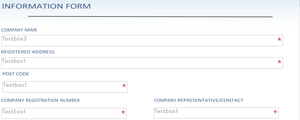
How can we remove "Textbox1" from the fields in our form via the Signatures tab?
Hi Everyone
We are trying to create a form for our customers to sign to open an account with us. I have uploaded the form to Dropbox. Is it possible to remove the word Textbox1 etc from the fiel...
 2 years ago
Hi Nancy
Have managed to find a work around this by adding several spaces in the field to trick the box into thinking there is a word present. Form looks perfect now

Nancy Dropbox Community Moderator
2 years agoDropbox Community ModeratorHey SamC88! Just to clarify, is “Textbox1” only showing when uploading your form to our platform?
Also, are you using Dropbox Sign or the Signatures tab on www.dropbox.com?
SamC88
2 years agoHelpful | Level 6
Hi Nancy
Textbox1 is not visible to me however when I send to the customer to complete it appears. I am using the text box which is under standard fields.
I am only using the signature tab for the bottom of the form the rest of the form they need to complete
- Nancy2 years ago
Thanks for clarifying, SamC88! One more thing I want to ask; do you wish to remove the text completely from the fields or modify it instead to something of your choice?
- SamC882 years agoHelpful | Level 6
Hi Nancy
I would prefer to remove the text please
- Nancy2 years ago
I understand. In this case, I’m afraid it’s not possible to remove this completely at the moment.
However, you should be able to change this from “Textbox1” to something else of your choice.
I can most definitely pass your feedback about this though to our team.
About Dropbox Sign

Ask your Dropbox Sign questions here.
The Dropbox Community team is active from Monday to Friday. We try to respond to you as soon as we can, usually within 2 hours.
If you need more help you can view your support options (expected response time for an email or ticket is 24 hours), or contact us on X, Facebook or Instagram.
For more info on available support options for your Dropbox plan, see this article.
If you found the answer to your question in this Community thread, please 'like' the post to say thanks and to let us know it was useful!


