Our Community is in read-only mode until April 8th, learn more here. You can still search existing threads or get help via Dropbox Support, the Dropbox Help Center, or Learn.
Forum Discussion

George A.
4 years agoHelpful | Level 5
How Do I Permanently Disable the External Drive Backup Feature as Default Behavior?
Dropbox just tried to UPLOAD over 400GB of data I had on an external USB drive I attached to my laptop through its External Drives Backups "Feature".
This is NOT good. This should NOT be defaul...
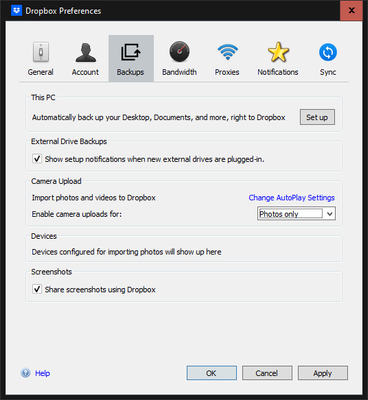

George A.
4 years agoHelpful | Level 5
UPDATE: I deleted this "External Drives Backup" folder from my Dropbox.Com file explorer...that appeared to add a ".dbxignore" file to the root of my external hard drive.
Hopefully that did the trick. I am going to copy this file to all my external hard drives...most prominently my aforementioned 14TB drive.
In the contents of this file was a URL link: https://help.dropbox.com/installs-integrations/sync-uploads/external-drive
...and this text:
# Hey there! This file was made by your friends at Dropbox to prevent syncing unneccessary files your computer generates.
About Create, Upload, and Share
Find help to solve issues with creating, uploading, and sharing files and folders with Dropbox.
The Dropbox Community team is active from Monday to Friday. We try to respond to you as soon as we can, usually within 2 hours.
If you need more help you can view your support options (expected response time for an email or ticket is 24 hours), or contact us on X, Facebook or Instagram.
For more info on available support options for your Dropbox plan, see this article.
If you found the answer to your question in this Community thread, please 'like' the post to say thanks and to let us know it was useful!


