We're making some changes to the Dropbox Community 👩💻 - Find out more here.
Forum Discussion

cgnerd
3 years agoHelpful | Level 6
Mac client continuously syncing with no file changes
For the past couple of weeks I've noticed that the Dropbox client is continuously syncing, even though there are no new files to sync. I can confirm that no files have been updated and need to be re-...

Jay Dropbox Community Moderator
3 years agoDropbox Community ModeratorThe 300k file limit is a soft limit depending on the machine itself.
Are you able to use selective sync to prevent entire folders from syncing to the site to see if this helps?

cgnerd
3 years agoHelpful | Level 6
I've made all of the folders that I don't currently need 'online-only' and I've calculated the number of files in the offline folders (28,438), less than 10% of your soft limit. The issue is still occurring.
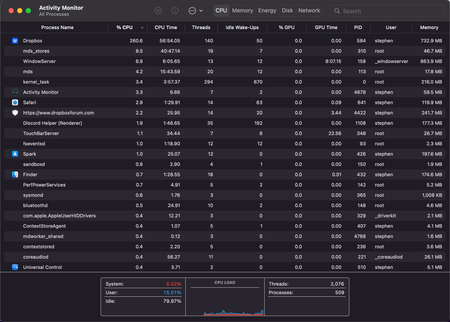
This is a screenshot of Dropbox not syncing, yet it's using up a whole core.
A couple of seconds later, it ramps up to 217%. Clicking on the Dropbox icon says it's syncing x number of files, but no changes have been made to the dropbox folder. There are no new files to sync. No new files are in the sync history either.
After a minute of this intense draw of power, it stops for a minute or so, then the process repeats again. I often have to pause Dropbox syncing if I'm having a video meeting as this excessive use of processing power makes the fans kick in.
- Hannah3 years ago
Sorry to jump in here, cgnerd.
The process of making a file online-only and selective sync are a bit different from each other.
Making a file online-only stops it from taking up space on your hard drive, but a placeholder file still remains in the folder.
With selective sync you can remove entire folders off of the Dropbox folder completely.
Can you try it, using the steps here, to see what happens?
- cgnerd3 years agoHelpful | Level 6
Hi Hannah, thanks for the reply and the clarification. I've used selective sync to remove most of the folders from Dropbox on my MBP, I'm left with 53,208 files:
I have given the Dropbox client time to chew through these changes and the icon is no longer regularly showing the sync symbol. I am finding that your client is still using a lot of power when there's nothing to do, but it's nowhere near as regular as before:
It's no longer regularly jumping up to and over 200%. Now, it's just a steady 100% for about 5 minutes every 20 minutes or so, which still causes the laptop to heat up and the fans to spin, just not as hot and loud as before.
As a comparison, I've been testing Nextcloud for file syncing. Maybe it isn't as smart as the Dropbox client and doesn't need to do background work when no new syncing is needed, but it never causes my computer to heat up and the fans to spin 😕
I think using selective sync to remove folders from your local Dropbox folder is a bit of an extreme step to take to reduce the load of your client, but it has made things slightly better so I'll mark your answer as correct. Thank you all for your help.
 TomBoo3 years agoHelpful | Level 6
Hi!
Thanks for pointing out this issue, @cgnerd, and for the suggested workaround, @Hannah. However, I don't agree with closing this topic...
We're facing the same issues, both before and after upgrading to macOS 12.3. It's also causing Dropbox to be slow, and the dropdown-menu doesn't show the Dropbox features... so we can't use "Send with Transfer", "Copy Dropbox link", etc.
In our case, not being able to rely on SmartSync and having to switch off a number of folders through SelectiveSync, is very troublesome. F.e. as Executive Director of our architecture office, I need to be able to view and check all folders directly from the Finder, relying also on the Spotlight search capabilities. We're on Dropbox Business Advanced, paying a substantial amount of money, so we should be able to rely on Dropbox to work properly. If certain functionalities and services are offered, they should work fine. Moreover, these functionalities are some of the reasons why we opted for Dropbox instead of another application. If such functionalities are no longer working or will be discontinued in the future, we should be informed in due time, allowing us to reconsider our subscription.
This being said, I sincerely hope there is a proper solution coming very soon to resolve this issue.
- cgnerd3 years agoHelpful | Level 6
I’ve removed the accepted solution as it’s only a partial solution and others are having the same issue.
 CRWM3 years agoHelpful | Level 5
Just wanted to chime in here to say I'm experiencing the exact same issues as others have mentioned in this thread.
Running a 2018 MacBook Pro with Touch Bar (Intel i5 3.3GHz processor, 16GB RAM, 1TB SSD) on macOS 12.3.1
Dropbox keeps fluctuating anywhere from 75% to 100% to 230% CPU usage, even with no file changes whatsoever.
The Dropbox sync could be completely finished, and yet the CPU usage is still off the charts. My MacBook fans are constantly spinning, and even if I close the lid on my MacBook Pro, it will go to sleep, but then I will hear the fans spin up again and continue to run for hours. I have to literally shut down my MacBook Pro to stop the fans & excessive CPU usage from Dropbox.
I've tried all of the suggestions offered in the Dropbox Community, everything from the basics like restarting the Mac, to Force Quitting all Dropbox tasks in Activity Monitor, re-installing the Dropbox app, etc. Nothing seems to help.
Truly hope that Dropbox dev team will make fixing this a priority, as my team & I rely on using Dropbox every day, and it's causing a huge headache for all of us with Dropbox's excessive CPU usage slowing everything else down. The only "workaround" I can think of would be to completely quit the Dropbox app and not use it to sync files in the background, then turn it on at the end of the day to let Dropbox sync... but that completely defeats the purpose of paying the huge monthly fees that we do for Dropbox Advanced, and eliminates any possibility of collaborating on files, plus risks file sync conflicts / corruption if two people were to work on the same file while sync is disabled, etc.
Please Dropbox do whatever you can to fix this issue asap.
In the meantime, the very least you could do is please have someone from your customer support team reach out to everyone in this thread and give us regular updates on your progress, so that we know how much longer we're going to have to wait for a resolution.
Otherwise we're likely going to have to look into taking our business elsewhere, and that would be a shame for everyone.

About Create, Upload, and Share
Find help to solve issues with creating, uploading, and sharing files and folders with Dropbox.
The Dropbox Community team is active from Monday to Friday. We try to respond to you as soon as we can, usually within 2 hours.
If you need more help you can view your support options (expected response time for an email or ticket is 24 hours), or contact us on X, Facebook or Instagram.
For more info on available support options for your Dropbox plan, see this article.
If you found the answer to your question in this Community thread, please 'like' the post to say thanks and to let us know it was useful!


