We're making some changes to the Dropbox Community 👩💻 - Find out more here.
Forum Discussion

cgnerd
3 years agoHelpful | Level 6
Mac client continuously syncing with no file changes
For the past couple of weeks I've noticed that the Dropbox client is continuously syncing, even though there are no new files to sync. I can confirm that no files have been updated and need to be re-...

cgnerd
3 years agoHelpful | Level 6
Hi Hannah, thanks for the reply and the clarification. I've used selective sync to remove most of the folders from Dropbox on my MBP, I'm left with 53,208 files:
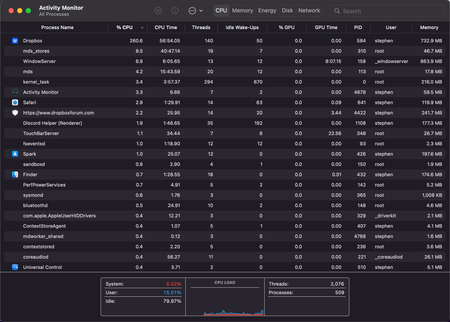
I have given the Dropbox client time to chew through these changes and the icon is no longer regularly showing the sync symbol. I am finding that your client is still using a lot of power when there's nothing to do, but it's nowhere near as regular as before:
It's no longer regularly jumping up to and over 200%. Now, it's just a steady 100% for about 5 minutes every 20 minutes or so, which still causes the laptop to heat up and the fans to spin, just not as hot and loud as before.
As a comparison, I've been testing Nextcloud for file syncing. Maybe it isn't as smart as the Dropbox client and doesn't need to do background work when no new syncing is needed, but it never causes my computer to heat up and the fans to spin 😕
I think using selective sync to remove folders from your local Dropbox folder is a bit of an extreme step to take to reduce the load of your client, but it has made things slightly better so I'll mark your answer as correct. Thank you all for your help.

TomBoo
3 years agoHelpful | Level 6
Hi!
Thanks for pointing out this issue, @cgnerd, and for the suggested workaround, @Hannah. However, I don't agree with closing this topic...
We're facing the same issues, both before and after upgrading to macOS 12.3. It's also causing Dropbox to be slow, and the dropdown-menu doesn't show the Dropbox features... so we can't use "Send with Transfer", "Copy Dropbox link", etc.
In our case, not being able to rely on SmartSync and having to switch off a number of folders through SelectiveSync, is very troublesome. F.e. as Executive Director of our architecture office, I need to be able to view and check all folders directly from the Finder, relying also on the Spotlight search capabilities. We're on Dropbox Business Advanced, paying a substantial amount of money, so we should be able to rely on Dropbox to work properly. If certain functionalities and services are offered, they should work fine. Moreover, these functionalities are some of the reasons why we opted for Dropbox instead of another application. If such functionalities are no longer working or will be discontinued in the future, we should be informed in due time, allowing us to reconsider our subscription.
This being said, I sincerely hope there is a proper solution coming very soon to resolve this issue.
- cgnerd3 years agoHelpful | Level 6
Completely get where you're coming from Tomboo, I also have issues with the dropbox options not showing up on a right click (I usually have to right click three or four times before the Dropbox options appear) and the client generally being slow. I closed this issue because the problem didn't seem to be my use of the Dropbox client, it seems to be that the client is just hogging more resources than needed. I doubt a Dropbox developer will jump into this thread and assure us that improvements are on the way (look at how long we had to wait for native Apple silicon support). This is why I've been trialing Nextcloud 😔
- rmundell3 years agoHelpful | Level 6
I am also seeing Dropbox using around 70% of my CPU resources pretty continually, and it keeps eating up disk space even after designating a lot of files as online only. The dropbox folder takes up half of the total storage on the Macbook (500Gb), even after I used selective synch to reduce the folders I need to keep offline. I am advised by tech support that I can no longer designate my dropbox folder to an external drive, and this version of Macbook cannot increase the drive storage internally.
- TomBoo3 years agoHelpful | Level 6
Dear rmundell,
As for the Dropbox taking up space: to our experience, this is a "virtual" problem, and Dropbox has a "solution" for it.
In your Settings on the Dropbox website, you can find a settings at the bottom of the first tab, called "Smart Sync update for Mac". The subtitle is the following "With this update, online-only files will no longer appear to take up hard drive space."
This solved the problem for us about Dropbox "using" a lot of storage space while it was actually not (because many files are online-only).
Hope that works for you!(As for the CPU usage: still no actual solution, but switching off a series of folders via Selective Sync seems to tuned down the issue. To be monitored and confirmed...)
- rmundell3 years agoHelpful | Level 6
Thanks.
Yes I turned off a lot of folders to not synch on the Mac and by the following morning had regained 115GB. I'd still prefer to be able to synch all of my files to an external USB drive that I can have with me when I am out of Internet range. (I like to work from the boat, which is often offline.)
 IanJUSyd3 years agoNew member | Level 2
I would like to add that I am experiencing exactly the same problems with dropbox too. I have a new MacBookPro, running MacOS 12.3.1. My subscription is via my institution and is a business package.
I use online-only storage options heavily to preserve hard drive space.
Constant background syncing yet no files are being synced in the activity menu, high impact on battery life, high impact on CPU performance.
When this occurs, the dropbox menu items in the right-click context menu do not appear, meaning I cannot pull online only files back onto the hard drive.
I frequently just turn off syncing to preserve battery life and then let it sync when the laptop is idle.
I am interested in seeing if a solution can be found to this as well.
About Create, Upload, and Share
Find help to solve issues with creating, uploading, and sharing files and folders with Dropbox.
The Dropbox Community team is active from Monday to Friday. We try to respond to you as soon as we can, usually within 2 hours.
If you need more help you can view your support options (expected response time for an email or ticket is 24 hours), or contact us on X, Facebook or Instagram.
For more info on available support options for your Dropbox plan, see this article.
If you found the answer to your question in this Community thread, please 'like' the post to say thanks and to let us know it was useful!


