We're making some changes to the Dropbox Community 👩💻 - Find out more here.
Forum Discussion

sosbo_4
2 years agoNew member | Level 2
PDF "view only" share link continues to allow editing
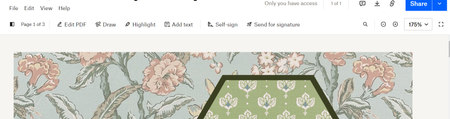
I have edited both my profile settings and the pdf settings specifically to generate a "view only" link. However, every time I go to share the link I continue to see on the top bar that the pdf is ed...
- 2 years ago
sosbo_4 wrote:
I have even logged out of my Dropbox account and used the link to see if it changed anything, it did not.
According to your screenshot you're still logged in, so it would make sense that it's editable. Make sure you're testing the link in an Incognito/private browsing session to ensure that you're not signed in to your account.


psingh432
1 year agoExplorer | Level 4
Hey, i'm attaching the images for both. pls check!

Megan Dropbox Community Moderator
1 year agoDropbox Community ModeratorHey psingh432, thanks for the added info!
So, if you click the "Edit PDF" option in the first screenshot, it allows you to sign in, and then edit the content, right?
Does this happen with this particular file only, or others too?
- psingh4321 year agoExplorer | Level 4
Hi Megan
So, if you click the "Edit PDF" option in the first screenshot, it allows you to sign in, and then edit the content, right?
no, it doesn't ask to sign in. it is directly opening the pdf for me in edit mode. (In Incognito) I'm able to edit it too. Though it says, I will need to sign in to save those changes. But the problem is since I shared the "view" mode link, it should not be editable for those who will open it through the link.
Does this happen with this particular file only, or others too?
i tried this with another pdf. I see same behaviour.
- Hannah1 year ago
Thanks for the update, psingh432.
I wanted to make some clarifications on this.
The preview of the PDF allows for editing, but these edits, even if the recipient was signed in to their Dropbox, wouldn't sync back to the original file; the saved file would be a copy of the original.
Keep in mind that the 'can view' link allows for downloading as well, so someone could download and edit the file that way, if they wanted to.
It's important to note, though, that no changes would be made to the original.

About Create, Upload, and Share
Find help to solve issues with creating, uploading, and sharing files and folders with Dropbox.
The Dropbox Community team is active from Monday to Friday. We try to respond to you as soon as we can, usually within 2 hours.
If you need more help you can view your support options (expected response time for an email or ticket is 24 hours), or contact us on X, Facebook or Instagram.
For more info on available support options for your Dropbox plan, see this article.
If you found the answer to your question in this Community thread, please 'like' the post to say thanks and to let us know it was useful!


