We're making some changes to the Dropbox Community 👩💻 - Find out more here.
Forum Discussion

mstroz
3 years agoHelpful | Level 5
Re-setting up Sync
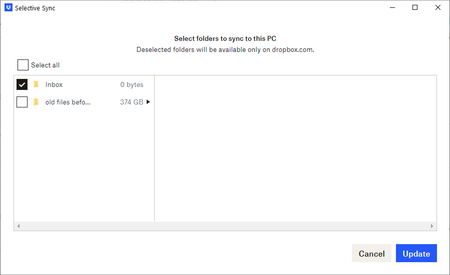
>>The problem: The system will not allow me to see or select local files & folders to sync to Dropbox. Below is a screenshot. >> The backstory: My Dropbox local app seemed to be having issues ...
- 3 years ago
mstroz wrote:
When did this change? I seem to remember being able to choose what directories I wanted synced to Dropbox across the computer it was installed on.
It hasn't changed. Selective Sync has always worked this way. Dropbox only syncs the files and folders you place in the Dropbox folder, and you can use Selective Sync (the window in your first screenshot) to remove the local copy of a folder while leaving it in your account online.
... I do have other dirs I would like to make available to other computers. Directories like shared notes and shared designs, etc.Move those folders into the Dropbox folder and they'll sync to your other devices.

Rich Super User II
3 years agoSuper User II
mstroz wrote:
When did this change? I seem to remember being able to choose what directories I wanted synced to Dropbox across the computer it was installed on.
It hasn't changed. Selective Sync has always worked this way. Dropbox only syncs the files and folders you place in the Dropbox folder, and you can use Selective Sync (the window in your first screenshot) to remove the local copy of a folder while leaving it in your account online.
... I do have other dirs I would like to make available to other computers. Directories like shared notes and shared designs, etc.
Move those folders into the Dropbox folder and they'll sync to your other devices.

mstroz
3 years agoHelpful | Level 5
You're right. I think my brain atrophied for a bit.
About Create, Upload, and Share
Find help to solve issues with creating, uploading, and sharing files and folders with Dropbox.
The Dropbox Community team is active from Monday to Friday. We try to respond to you as soon as we can, usually within 2 hours.
If you need more help you can view your support options (expected response time for an email or ticket is 24 hours), or contact us on X, Facebook or Instagram.
For more info on available support options for your Dropbox plan, see this article.
If you found the answer to your question in this Community thread, please 'like' the post to say thanks and to let us know it was useful!


