Your workflow is unique 👨💻 - tell us how you use Dropbox here.
Forum Discussion

slypapp
7 years agoExplorer | Level 4
Re: Smart Sync set to Online Only but still taking up storage on macOS 10.13.4.
Hello!
I am also having the same problem with smart sync, although I am using macOS 10.13.4. I have a folder set to online-only, but it is still taking up the free space from my SSD.
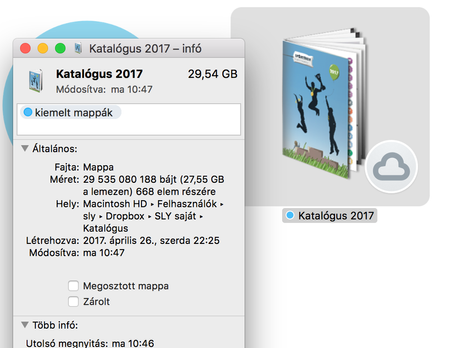
- 7 years agoAs it’s my understanding that there’s a discrepancy when it come to the usage reported on your hard disc, I’d like to send you a couple more details below & we’ll take it from there.
- Initially, do you see all your files in this folder being saved locally (despite your choice being otherwise) or some of your files in this folder?
- Can you also let me know some example file types, where you’ve noticed this behavior?
Incidentally, are there any applications that constantly or persistently look at your files (or monitor your Dropbox folder)? If so, please note that your files may be accessed in the background if you didn't recall them manually & for that reason these are saved locally anew. If this is the case, I'd suggest testing by temporarily quitting or disabling applications systematically until you see that the issue is resolved (i.e. once you set the folder to “Online-only” & this doesn’t change without your input).Thanks again & I’ll be awaiting your next reply with your findings here!  7 years ago
And here's more GOOD news! I just realized that on a Mac, at least, I can simpy use <command> i to get info on any folder on my (500GB) mac. The Dropbox folder is 942GB - that's what shows in Finder. BUT!!! <command> i shows BOTH: 942,787,185,844 bytes (352 GB on disk) for 392,264 items This works at all folder levels. - Voila! Solution to MY problem. Hope that helps others....

dannywleo
7 years agoExplorer | Level 4
Hello.
I am using Mac OS 10.13.4
My drop box folder shows 58 gigs / 58 gigs on disk but the local folders only add up to 12 gigs on disc.
Please help
Danny

Jane Dropbox Staff
7 years agoDropbox StaffHey dannywleo, welcome aboard & thanks for getting in touch with us here, let’s have a look at the Smart Sync-related behavior you’re experiencing & we’ll take it from there!
For starters, you may keep in mind that we’ve just released a new Stable Build (50.4.71), so it’s advisable to ensure that you’re running this one on your affected devices.
Following, please let me re-iterate that it’s also advisable to let me know how the discrepancy appears to you, in order to investigate what happened as closely as possible (eg. Can you load your overlay icons as expected?).
Incidentally, have you had a chance to check back on the tips I posted to slypapp on the first page of this thread? I’d appreciate it if you included a screengrab (omitting personal info) of what you’re seeing in your next message here, so that we check the case & send over the most relevant troubleshooting steps.
Once I have this info, I’ll do my best to check back with you in the best possible way. Thanks again!
About Create, Upload, and Share
Find help to solve issues with creating, uploading, and sharing files and folders with Dropbox.
The Dropbox Community team is active from Monday to Friday. We try to respond to you as soon as we can, usually within 2 hours.
If you need more help you can view your support options (expected response time for an email or ticket is 24 hours), or contact us on X, Facebook or Instagram.
For more info on available support options for your Dropbox plan, see this article.
If you found the answer to your question in this Community thread, please 'like' the post to say thanks and to let us know it was useful!


