Need to see if your shared folder is taking up space on your dropbox 👨💻? Find out how to check here.
Forum Discussion

Mani26750
2 years agoExplorer | Level 4
Request for Assistance with Files Naming Conventions in Dropbox
Hello,
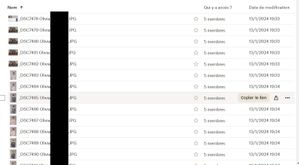
I am currently working with photographers who upload their files to Dropbox in response to my requests. However, I am encountering an issue: the uploaded files invariably include the...

Mani26750
2 years agoExplorer | Level 4
Hello @Здравко,
I come back to you. Could you please say me how I can "wipe the naming convention you have set (probably unintentionally) to that request" ?
Thank you for your help

Здравко
2 years agoLegendary | Level 20
- Mani267502 years agoExplorer | Level 4
Thank you very much !!!!
- Mani267502 years agoExplorer | Level 4
Juste last think : must I do it each time ? I mean for each new request files ?
I would like to correct it for every time, but I don't find where is it .
- Здравко2 years agoLegendary | Level 20
By default usually it's not set. So, just avoid to set it when creating new link. Wherever already set, you should clear by hand.
About Create, upload, and share
Find help to solve issues with creating, uploading, and sharing files and folders in Dropbox. Get support and advice from the Dropbox Community.
The Dropbox Community team is active from Monday to Friday. We try to respond to you as soon as we can, usually within 2 hours.
If you need more help you can view your support options (expected response time for an email or ticket is 24 hours), or contact us on X, Facebook or Instagram.
For more info on available support options for your Dropbox plan, see this article.
If you found the answer to your question in this Community thread, please 'like' the post to say thanks and to let us know it was useful!


