Our Community is in read-only mode until April 8th, learn more here. You can still search existing threads or get help via Dropbox Support, the Dropbox Help Center, or Learn.
Forum Discussion

Aegon
3 years agoNew member | Level 2
Smart Sync has disappeared from context menu
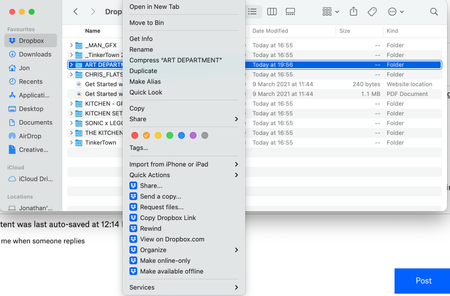
In my Dropbox folder in Finder, I right click on a folder/file and I no longer have the option for Smart Sync. Has anyone found a solution to this? I have tried all of the solutions that I can fin...
- 3 years ago
Aegon wrote:
In my Dropbox folder in Finder, I right click on a folder/file and I no longer have the option for Smart Sync. Has anyone found a solution to this?
You still have the options and they're visible in your screenshot. Dropbox has just renamed them in the more recent versions. Local is now shown as Make available offline and Online-only is now shown as Make online-only. They're no longer listed in a separate sub-menu.


Hannah Dropbox Community Moderator
3 years agoDropbox Community ModeratorHey Lynn Bennett, thanks for the nudge here!
Can you please clarify what you'd like to do exactly?
The options to make a file online-only or available offline, should be there when you right-click on a file in your Dropbox folder.
Is that not what you see on your end?

Lynn Bennett
3 years agoExplorer | Level 3
DropBox made me upgrade in order for the smart sync to work. I really enjoyed and will miss the free version. LOL!
About Create, Upload, and Share
Find help to solve issues with creating, uploading, and sharing files and folders with Dropbox.
The Dropbox Community team is active from Monday to Friday. We try to respond to you as soon as we can, usually within 2 hours.
If you need more help you can view your support options (expected response time for an email or ticket is 24 hours), or contact us on X, Facebook or Instagram.
For more info on available support options for your Dropbox plan, see this article.
If you found the answer to your question in this Community thread, please 'like' the post to say thanks and to let us know it was useful!


