Our Community is in read-only mode until April 8th, learn more here. You can still search existing threads or get help via Dropbox Support, the Dropbox Help Center, or Learn.
Forum Discussion

Aegon
3 years agoNew member | Level 2
Smart Sync has disappeared from context menu
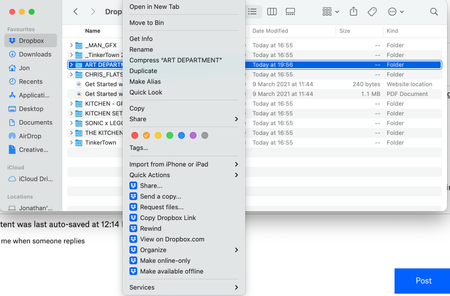
In my Dropbox folder in Finder, I right click on a folder/file and I no longer have the option for Smart Sync. Has anyone found a solution to this? I have tried all of the solutions that I can fin...
- 3 years ago
Aegon wrote:
In my Dropbox folder in Finder, I right click on a folder/file and I no longer have the option for Smart Sync. Has anyone found a solution to this?
You still have the options and they're visible in your screenshot. Dropbox has just renamed them in the more recent versions. Local is now shown as Make available offline and Online-only is now shown as Make online-only. They're no longer listed in a separate sub-menu.


heikkipekka
3 years agoHelpful | Level 6
I’d like to understand this clearly:
Has the latest version of macOS and Dropbox app returned the Smart Sync function, where a file I’ve made available online-only is been downloaded in the background if it’s accessed in a third-party app like part of a, lets say an Adobe InDesign file as a link to a JPEG image?
I’ve not upgraded my M1 MacBook Air to macOS 12.3 as this support page still after half a year still suggests Smart Sync feature still IS NOT available in newer macOS versions: https://help.dropbox.com/installs-integrations/desktop/macos-12-monterey-support.
As I no longer find any mention of Smart Sync function on Dropbox website, and that support page suggests the old way of supporting third-party apps no longer work, I’m left with a conclusion Dropbox no longer serves me the way it has, and I have to reconsider any more paying for the subscription.
Has the latest version of macOS and Dropbox app returned the Smart Sync function, where a file I’ve made available online-only is been downloaded in the background if it’s accessed in a third-party app like part of a, lets say an Adobe InDesign file as a link to a JPEG image?
I’ve not upgraded my M1 MacBook Air to macOS 12.3 as this support page still after half a year still suggests Smart Sync feature still IS NOT available in newer macOS versions: https://help.dropbox.com/installs-integrations/desktop/macos-12-monterey-support.
As I no longer find any mention of Smart Sync function on Dropbox website, and that support page suggests the old way of supporting third-party apps no longer work, I’m left with a conclusion Dropbox no longer serves me the way it has, and I have to reconsider any more paying for the subscription.

Hannah Dropbox Community Moderator
3 years agoDropbox Community ModeratorHey heikkipekka, thanks for taking the time to post here.
This concern is only impacting our customers on macOS 12.3 and above.
Any customer that's running macOS 12.3 and below, will still have full functionality of the feature.
All apps should be able to access online-only content as macOS 12.2 devices and below.
And of course, we're currently working on fully supporting macOS 12.3 and above, as mentioned in this article.
 joshblevins3 years agoExplorer | Level 4
Hi Hannah,
It is nice that this issue only affects people who have updated their MacOS at some point since mid-January, when OS 12.3 was released. I assume that this means that, unfortunately, 97% of Mac users still have this problem. It is unacceptable that Dropbox is still running a year behind the times--and is a year late delivering one of the key features Dropbox users are paying for.
There have been promises of this feature being restored for Mac users for ages, with no date certain ever provided and no promised results ever delivered.
When does Dropbox expect this feature to return? Also, what sort of compensation is Dropbox able to provide for this sustained loss of functionality to those of us who for those of us who have, in good faith, taken Dropbox at its word that this functionality will be returning imminently, month after month?
- heikkipekka3 years agoHelpful | Level 6Josh,
We’re been silly. Of course the blame is on us waiting (and paying) for YEARS for Smart Sync to return.
I think it’s just time to move on and unsubscribe Dropbox. Sorry to come to that conclusion. Sad.
About Create, Upload, and Share
Find help to solve issues with creating, uploading, and sharing files and folders with Dropbox.
The Dropbox Community team is active from Monday to Friday. We try to respond to you as soon as we can, usually within 2 hours.
If you need more help you can view your support options (expected response time for an email or ticket is 24 hours), or contact us on X, Facebook or Instagram.
For more info on available support options for your Dropbox plan, see this article.
If you found the answer to your question in this Community thread, please 'like' the post to say thanks and to let us know it was useful!


