Your workflow is unique 👨💻 - tell us how you use Dropbox here.
Forum Discussion

hugon
3 years agoExplorer | Level 4
Some files shows 0 byte
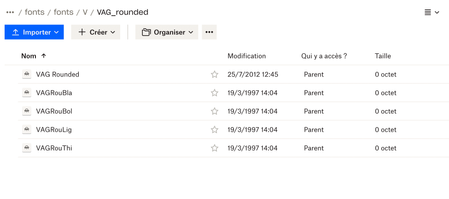
So I have some files showing 0 bytes on Dropbox website.
When I try to download individually a file, it's gonna be a 0 byte file and when I try to open it with a text editor it's empty.
When...

Jay Dropbox Community Moderator
3 years agoDropbox Community ModeratorHi hugon, thanks for bringing this to our attention.
Do the files appear the same way on the Dropbox site when you use another browser?
Are these files that can only be opened on Mac devices?
This will help me to assist further!
 Typearture2 years agoExplorer | Level 3
I ran into this same issue, when transferring files from Mac to Windows 11 (in S mode, so I believe that's the reason).
The files are all correct on the Mac side, and I can see the correct file size in the Windows inspector. Just not when downloading them.
Guess it's some kind of security issue?
- Nancy2 years ago
Hi Typearture! I hope you’re doing well.
Can you please let me know how you transferred your files from your Mac device to your Windows computer? Did you use a third-party app to do this?
Are you seeing the correct file sizes on the Mac desktop app, but not the Windows app? What do you see on www.dropbox.com?
- Typearture2 years agoExplorer | Level 3
Hi Nancy
Both machines are logged in on the same dropbox, so for my Mac I just drag them over, for the Windows machine I download them through the Dropbox-S app. In the app on the Windows machine, dropbox.com and in my Mac finder, all files are shown correctly.
It's only when I download them through the Dropbox Windows-11 S app that the fonts are set to 0 bytes.
This could be an Windows 11-S issue though, the files are probably seen as installable software (which they are in the end) and disabled. This is fixable through an upgrade, but as I need to test things in 11-S, I rather keep it this way.

About Create, Upload, and Share
Find help to solve issues with creating, uploading, and sharing files and folders with Dropbox.
The Dropbox Community team is active from Monday to Friday. We try to respond to you as soon as we can, usually within 2 hours.
If you need more help you can view your support options (expected response time for an email or ticket is 24 hours), or contact us on X, Facebook or Instagram.
For more info on available support options for your Dropbox plan, see this article.
If you found the answer to your question in this Community thread, please 'like' the post to say thanks and to let us know it was useful!


