Our Community is in read-only mode until April 8th, learn more here. You can still search existing threads or get help via Dropbox Support, the Dropbox Help Center, or Learn.
Forum Discussion

WendyNield
5 years agoHelpful | Level 5
Suddenly, I can't open my online-only Smart Sync files
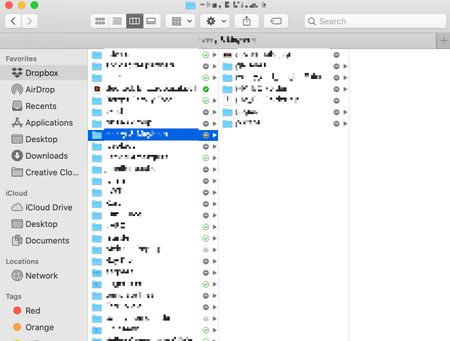
I have been using Dropbox without issue for years, and Smart Sync seamlessly since December. Suddenly today, when I go to open files from a folder that I have not used in months, I am getting an erro...
 5 years ago
Doh! That was the problem! I had forgotten that I was using Smart Sync AND Selective sync. Ok. Is there a way to change the sync status of a folder without going into Dropbox preferences? It seems like there must be an easier way that how I've been doing it.
Thanks!
Wendy

Walter Dropbox Community Moderator
5 years agoDropbox Community ModeratorHi WendyNield; welcome to our Community and happy Friday!
You shouldn't be having issues if you ensure that those files are set to 'Local', assuming that you get the Smart Sync options for them.
Could it be that you have had these folders selectively un-synced from that computer?
Quoting from the relevant article here, the gray circle with the minus sign may appear on a file or folder when you're using the selective sync feature meaning you've opted not to sync this file or folder on your computer so I'd suggest taking a look at your sync settings through the app's preferences as well.
Let me know what you find Wendy!
- WendyNield5 years agoHelpful | Level 5
Doh! That was the problem! I had forgotten that I was using Smart Sync AND Selective sync. Ok. Is there a way to change the sync status of a folder without going into Dropbox preferences? It seems like there must be an easier way that how I've been doing it.
Thanks!
Wendy
About Create, Upload, and Share
Find help to solve issues with creating, uploading, and sharing files and folders with Dropbox.
The Dropbox Community team is active from Monday to Friday. We try to respond to you as soon as we can, usually within 2 hours.
If you need more help you can view your support options (expected response time for an email or ticket is 24 hours), or contact us on X, Facebook or Instagram.
For more info on available support options for your Dropbox plan, see this article.
If you found the answer to your question in this Community thread, please 'like' the post to say thanks and to let us know it was useful!


