Our Community is in read-only mode until April 8th, learn more here. You can still search existing threads or get help via Dropbox Support, the Dropbox Help Center, or Learn.
Forum Discussion

TimB2
1 year agoExplorer | Level 4
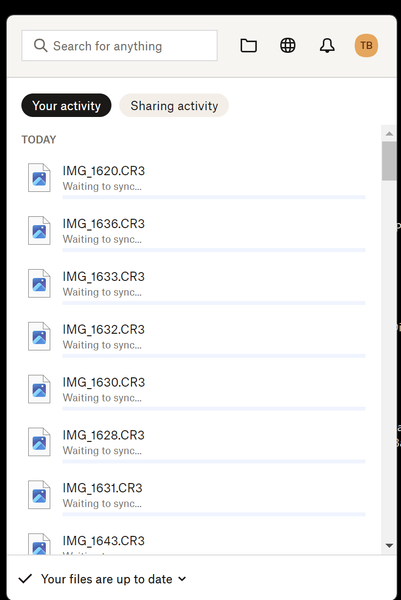
When are files actually synced in the desktop app on Windows?
As the attached screenshot shows, when I look in the Dropbox manager in the Windows taskbar it simultaneously tells me that “Your files are up to date” while also listing all the files still “Waiting...
 1 year ago
Hi Jay,
I think the problem was a specific folder. I'm not sure, if it is somehow related to this folder having files in it which are commonly "open" within an application I use. The problem resolved itself after I rebooted my PC.
Cheers
Steven

TimB2
1 year agoExplorer | Level 4
No, I am just using File Explorer to move them. I connect the camera to the computer with a USB-C cable, CTRL-A to select all, and then click-and-drag.
What you seem to be telling me is that your taskbar manager is just for show and not a real indicator of what is happening in Dropbox and if I want to know anything about the status of my files I have to look in File Manager. Is that correct?

Megan Dropbox Community Moderator
1 year agoDropbox Community ModeratorHey @TimB2!
After looking through our system, it looks like you have an escalated ticket with our Specialized team at the moment.
They are working on getting to the bottom of this as soon as possible, and figure out why this might be happening on your end.
We appreciate your patience while they're trying to rectify this issue.
About Create, Upload, and Share
Find help to solve issues with creating, uploading, and sharing files and folders with Dropbox.
The Dropbox Community team is active from Monday to Friday. We try to respond to you as soon as we can, usually within 2 hours.
If you need more help you can view your support options (expected response time for an email or ticket is 24 hours), or contact us on X, Facebook or Instagram.
For more info on available support options for your Dropbox plan, see this article.
If you found the answer to your question in this Community thread, please 'like' the post to say thanks and to let us know it was useful!


