Our Community is in read-only mode until April 8th, learn more here. You can still search existing threads or get help via Dropbox Support, the Dropbox Help Center, or Learn.
Forum Discussion

TimB2
1 year agoExplorer | Level 4
When are files actually synced in the desktop app on Windows?
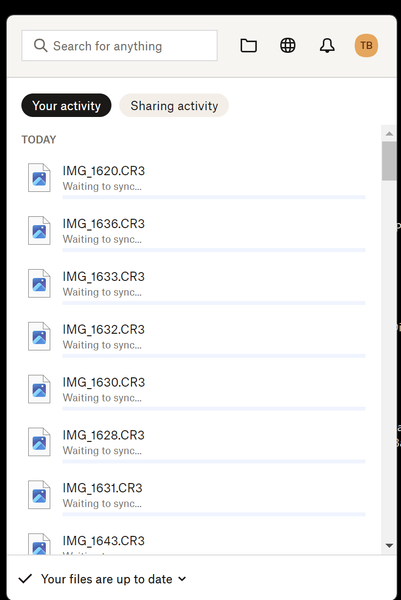
As the attached screenshot shows, when I look in the Dropbox manager in the Windows taskbar it simultaneously tells me that “Your files are up to date” while also listing all the files still “Waiting...
 1 year ago
Hi Jay,
I think the problem was a specific folder. I'm not sure, if it is somehow related to this folder having files in it which are commonly "open" within an application I use. The problem resolved itself after I rebooted my PC.
Cheers
Steven
dman1903
1 year agoNew member | Level 2
I seem to consistently have this problem, as do my colleagues. I cannot tell, if it still needs to sync or not, there is often/always a list "Waiting to sync”s, whilst at the same time it says “Your files are up to date” .

Jay Dropbox Community Moderator
1 year agoDropbox Community ModeratorHi @dman1903, what OS and Dropbox desktop application version are you running on your machine?
- dman19031 year agoNew member | Level 2
Hi Jay, Im on Dropbox version 206.4.6506, and on Windows 10 Pro 22H2.
Thanks.
- Jay1 year ago
Do you see files in Finder with a cloud icon, like in this article?
Are these files that are waiting to sync in the same folder, or different areas?
- dman19031 year agoNew member | Level 2
Hi Jay,
I think the problem was a specific folder. I'm not sure, if it is somehow related to this folder having files in it which are commonly "open" within an application I use. The problem resolved itself after I rebooted my PC.
Cheers
Steven
About Create, Upload, and Share
Find help to solve issues with creating, uploading, and sharing files and folders with Dropbox.
The Dropbox Community team is active from Monday to Friday. We try to respond to you as soon as we can, usually within 2 hours.
If you need more help you can view your support options (expected response time for an email or ticket is 24 hours), or contact us on X, Facebook or Instagram.
For more info on available support options for your Dropbox plan, see this article.
If you found the answer to your question in this Community thread, please 'like' the post to say thanks and to let us know it was useful!


