Our Community is in read-only mode until April 8th, learn more here. You can still search existing threads or get help via Dropbox Support, the Dropbox Help Center, or Learn.
Forum Discussion

Michael N.28
4 years agoCollaborator | Level 8
Why does DropBox rename photos based on modification date rather than creation date?
Previously, DropBox renamed camera uploads based on the photos creation date (EXIF: Date/Time Original). This makes sense because you want the photos to be name-sorted based on when they were taken. ...

Jay Dropbox Community Moderator
4 years agoDropbox Community ModeratorJust to clarify, is the original photo uploaded automatically to Dropbox, and then a second copy is uploaded, or is the original image overwritten, or never uploaded in the first place?

Michael N.28
4 years agoCollaborator | Level 8
Each image is uploaded only once. That is, when I hit the "Photos" button in the DropBox iOS app. There is no automatic upload.
If I have edited the image before uploading, then DropBox names it using the file modification date.
If I have not edited the image before uploading, then the creation date is the same as the modification date. I'm assuming that DropBox always uses the file modification date. I think that's the wrong thing to do.
DropBox should rename photos using the EXIF CreateDate or, if there is no EXIF data (like a screenshot or other non-camera image) then DropBox should use the file creation date.
Here's an example. In this case DropBox set the file name to: 2021-10-06 14.14.19.heic
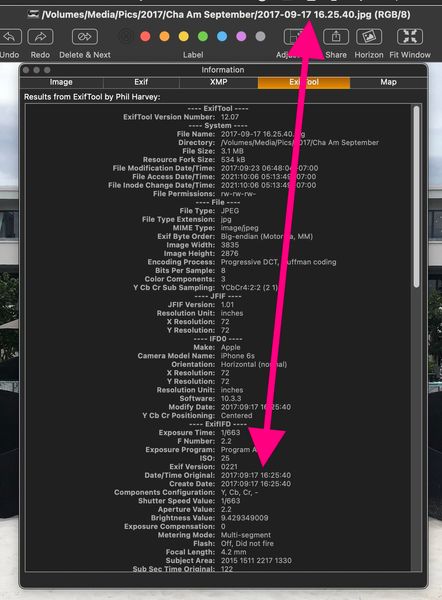
If you look at the EXIF date data below, you will see that the creation date is: 2021:10:06 14:13:39
I edited the file on the iPhone using the Photos app at: 2021:10:06 14:14:19+07:00. That's the date DropBox used to rename the file.
What follows is the date info from the EXIF file:
MrMuscle:Camera Uploads mnewman$ exiftool "/Users/mnewman/Dropbox/Camera
Uploads/2021-10-06 14.14.19.heic" | grep "Date"
File Modification Date/Time : 2021:10:06 14:14:19+07:00
File Access Date/Time : 2021:10:06 17:21:26+07:00
File Inode Change Date/Time : 2021:10:06 17:21:24+07:00
Date/Time Original : 2021:10:06 14:13:39
Create Date : 2021:10:06 14:13:39
Modify Date : 2021:10:06 14:13:39
Date Created : 2021:10:06 14:13:39
- Jay4 years agoIf you're using the automatic camera upload feature, then there's no need to tap the Photos button to have the image upload. It should be doing it already before then. Technically, edited images should have two images on Dropbox, the original, and the later edited image.
Whenever an image appears in the camera roll, that is the date and time that appears on the Dropbox site when renamed. Essentially, new images are 'modified' at the same time as the creation date.
Images that are later edited have a new modification date, and that is what is used when uploaded. Is a second image created on the camera roll, or is the original overwritten in the camera roll?- Michael N.284 years agoCollaborator | Level 8
I give up.
It's clear that I'm not able to explain myself clearly.
Sorry for the trouble.
Anyway, since I now have a workaround to correct what I see as incorrect file names assigned by GrabBox, the point is mute.
 messagedj4 years agoHelpful | Level 6
@Michael N.28, I know exactly what you mean, you explained the problem 100% clear. And it is quite stupid that your question is not understood.
I have exactly the same issue. Yesterday, I started taking pictured at 13:15 I made several pictures from a location I visited for my work. I use these pictures for presentations. I know what time I was where. But all my pictures in dropbox are renamed
2021-10-13 19.46.06-1
2021-10-13 19.46.06-2
2021-10-13 19.46.06-3
2021-10-13 19.46.06-4
2021-10-13 19.46.06-5 and so on
19.46 is 7 hours later that I actually took them. All my settings are set right! It has always worked out perfectly.
Dropbox changed the way files are being renamed. There is no question about that!
About Create, Upload, and Share
Find help to solve issues with creating, uploading, and sharing files and folders with Dropbox.
The Dropbox Community team is active from Monday to Friday. We try to respond to you as soon as we can, usually within 2 hours.
If you need more help you can view your support options (expected response time for an email or ticket is 24 hours), or contact us on X, Facebook or Instagram.
For more info on available support options for your Dropbox plan, see this article.
If you found the answer to your question in this Community thread, please 'like' the post to say thanks and to let us know it was useful!


