Your workflow is unique 👨💻 - tell us how you use Dropbox here.
Forum Discussion

chiragsadhnani
2 months agoExplorer | Level 4
I'm concerned about what will happen to my files after downgrading my account
Hello Dropbox Community Team,
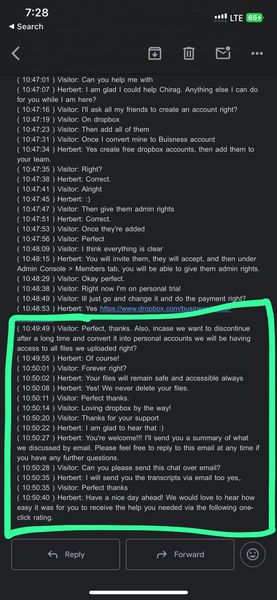
I’m writing to raise a serious concern regarding a written assurance from Dropbox support that now appears to be contradicted.
At the time of using Dropbox, a Dropbo...
- 2 months ago
Hey chiragsadhnani, thanks taking the time to post to our Community.
I completely understand your concern over this, and I really appreciate your feedback, so I'll give you some info to clarify the situation.
Our colleague was right in telling you that your files will stay in your account even if you downgrade it.
However, there are some parameters that affect this, like your available storage space.
You can see more about what happens if you exceed your available storage space here.
Let me know if you have any further questions.


chiragsadhnani
2 months agoExplorer | Level 4
Hi Hannah,
Thanks for the response.
While Dropbox did provide time to adjust, my concern remains that the original assurance was not conditional. I was told that my files would remain in my account even if I downgraded, with no indication that later enforcement of storage limits could result in deletion.
I also want to clarify that I didn’t move to Basic by choice. I was forced to because the cost increase was incredibly high, not a marginal 20–30% hike, and simply not sustainable.
Offloading 40TB of data is not a trivial task, especially when the very reason for using Dropbox was long-term cloud storage. This was a major shift initiated by Dropbox — from unlimited to limited storage.
I’m not asking for additional storage. I’m only asking that existing files uploaded under the original terms remain intact, as assured by Dropbox support.
I’d appreciate this being reviewed and escalated.
Best,
Chirag

Dell_Dropbox Community Manager
2 months agoCommunity Managerchiragsadhnani we appreciate your patience and understand your concerns, hopefully I can provide some info to clarify the situation.
The information that you were previously provided was accurate at that time. However, our policies may change from time to time, and when that happens we provide notice to our customers to ensure they are aware of any changes that may impact them with ample time to take action.
In this case, Dropbox subsequently began enforcing quota limits for our free tier (Dropbox Basic). For Basic users, files may be deleted until they are under quota. You can find out what will happen to your files if you exceed your available storage space here.
I hope that helps. Let me know if you have any additional questions.
About Storage Space
Looking for help with managing the storage space in your Dropbox account? Talk to the Dropbox Community and get advice from members.
The Dropbox Community team is active from Monday to Friday. We try to respond to you as soon as we can, usually within 2 hours.
If you need more help you can view your support options (expected response time for an email or ticket is 24 hours), or contact us on X, Facebook or Instagram.
For more info on available support options for your Dropbox plan, see this article.
If you found the answer to your question in this Community thread, please 'like' the post to say thanks and to let us know it was useful!


