Your workflow is unique 👨💻 - tell us how you use Dropbox here.
Forum Discussion

wamsender
1 year agoExplorer | Level 4
Says I’m maxed out on storage, but I’m not…
I have 18.25 gigs available that I got for free from several people signing up for a Dropbox account through me. I deleted 90% of everything…and permanently deleted…and it still shows maxed out and no...
- 1 year ago
wamsender wrote:
Can I delete my backup? That seems to be the problem...???
As mentioned on Saturday, you have the backup feature enabled. Refer to the following links to learn how to manage your backups.


ianshere
1 year agoExplorer | Level 3
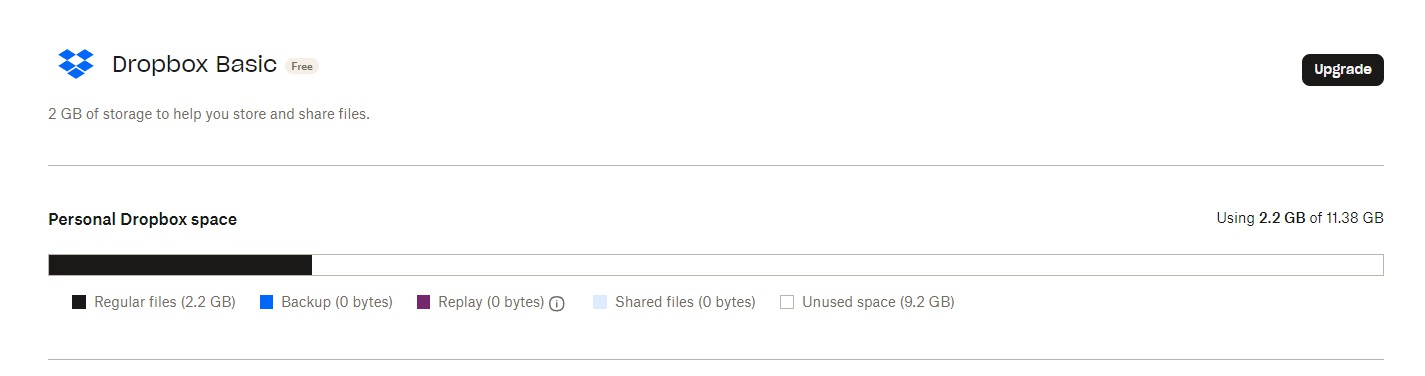 Not even vaguely close to my limit - 2.22Gb of 11.38Gb Dropbox reports. I checked, and cleaned out, a bunch of files and folders from Shared and Home Page, but it didn't make a difference to the 2.22Gb that I was reported as using, and, when trying to copy a single small file - 3-400kb - it failed again.


About Storage Space
Looking for help with managing the storage space in your Dropbox account? Talk to the Dropbox Community and get advice from members.
The Dropbox Community team is active from Monday to Friday. We try to respond to you as soon as we can, usually within 2 hours.
If you need more help you can view your support options (expected response time for an email or ticket is 24 hours), or contact us on X, Facebook or Instagram.
For more info on available support options for your Dropbox plan, see this article.
If you found the answer to your question in this Community thread, please 'like' the post to say thanks and to let us know it was useful!


