We're making some changes to the Dropbox Community 👩💻 - Find out more here.
Forum Discussion

frozenstein
6 months agoNew member | Level 2
"There is not enough space on Dropbox" error when copying files from my Dropbox folder
Device (Lenovo LOQ15) Operating System/Browser (if using the web) (Windows 11) Dropbox App Version/Browser Version (230.4.8797)
Question or Issue I'm trying to copy from Dropbox to a hard-dri...
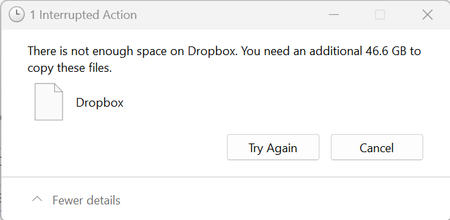
- 6 months ago
Hey frozenstein, did you manage to resolve the issue now?
I'm assuming the culprit here might be the space on your C: drive.
Provided that the issue remains, feel free to send me a couple of screenshots of the available space on the drive that you're copying from, and one from the drive you're copying to.


Rich Super User II
6 months agoSuper User IIfrozenstein wrote:I'm trying to copy from Dropbox to a hard-drive and I keep getting this error message.
Are the files marked as Available offline or Online-only? If online-only, do you have enough available space on your local drive where your Dropbox folder is located?
About Storage Space
Looking for help with managing the storage space in your Dropbox account? Talk to the Dropbox Community and get advice from members.
The Dropbox Community team is active from Monday to Friday. We try to respond to you as soon as we can, usually within 2 hours.
If you need more help you can view your support options (expected response time for an email or ticket is 24 hours), or contact us on X, Facebook or Instagram.
For more info on available support options for your Dropbox plan, see this article.
If you found the answer to your question in this Community thread, please 'like' the post to say thanks and to let us know it was useful!


