Your workflow is unique 👨💻 - tell us how you use Dropbox here.
Forum Discussion

goblynn93
2 years agoNew member | Level 2
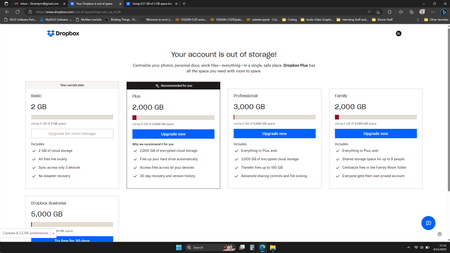
Using 0 GB of 2 GB space but DropBox says I'm out of space.
Haven't been able to use DropBox for months because of the issue in the title. I have deleted EVERYTHING but I am still "out of room" no shares, no backups, nothing.

Hannah Dropbox Community Moderator
2 years agoDropbox Community ModeratorHey goblynn93, thanks for bringing this to our attention.
Can you please go to the plan tab in your account settings and send us a screenshot of what you see there?
Also, how do you get to the page in the screenshot? Are you clicking on some kind of pop-up or banner in your account?
Thanks in advance!

goblynn93
2 years agoNew member | Level 2
The screenshot I attached is what DropBox shows me every time I log in. I am not dumb enough to ever click on any banner ad anywhere on the internet. I will never ever click any ad ever.
I've attached the request Plan screenshot.
- Nancy2 years ago
Hi goblynn93, I’m sorry to hear about the situation.
As the next step, can you please clear your browser’s cache and let me know if that makes any difference? Do you see the same thing if you switch browsers or log in to your Dropbox account via an incognito window?
Besides that, I’d like to ask you if you’re having any trouble uploading new files, or when trying to take any other action on your Dropbox account.
Keep me posted!

About Storage Space
Looking for help with managing the storage space in your Dropbox account? Talk to the Dropbox Community and get advice from members.
The Dropbox Community team is active from Monday to Friday. We try to respond to you as soon as we can, usually within 2 hours.
If you need more help you can view your support options (expected response time for an email or ticket is 24 hours), or contact us on X, Facebook or Instagram.
For more info on available support options for your Dropbox plan, see this article.
If you found the answer to your question in this Community thread, please 'like' the post to say thanks and to let us know it was useful!


