Your workflow is unique 👨💻 - tell us how you use Dropbox here.
Forum Discussion

renegade909
2 years agoExplorer | Level 3
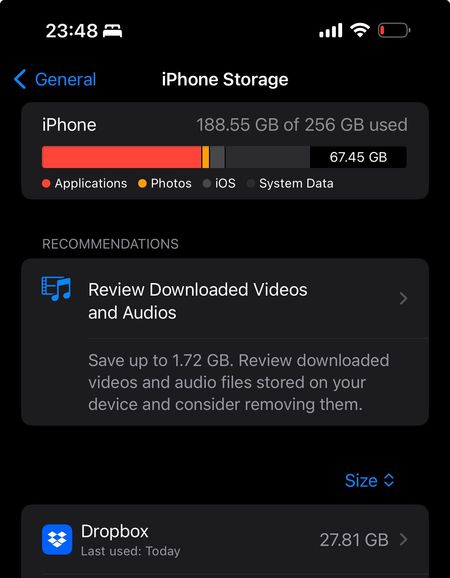
Why does the mobile app say I have no storage space on my device when I do?
I have Dropbox iOS app and a Plus account with 2TB space. I'm currently uploading all my phones pictures and videos but started getting a message saying my device storage is full. I checked and I hav...

Hannah Dropbox Community Moderator
2 years agoDropbox Community ModeratorThanks for bringing this to our attention, renegade909.
Can you open the Dropbox app, tap on "account", then on the gear icon and then on "clear cache", to see if that helps?
Keep me posted!

renegade909
2 years agoExplorer | Level 3
Hi Hannah, that didn't change anything and I'm still getting the same message.
- Hannah2 years ago
Hey renegade909, thanks for the update.
If you haven't already, can you also uninstall the Dropbox app, restart your device and then reinstall it?
- renegade9092 years agoExplorer | Level 3
It seems to have got rid of the disk space issue, thank you.
Since I reinstalled the app the number of images and videos that need to be uploaded has doubled and it takes a long time. Is there any way to speed up the upload process?
- Jay2 years ago
Hi renegade909, there isn't a method to increase the upload speed on the mobile app, aside from keeping the phone connected to power, if there is low battery, and not using any other network apps during the upload.

About Storage Space
Looking for help with managing the storage space in your Dropbox account? Talk to the Dropbox Community and get advice from members.
The Dropbox Community team is active from Monday to Friday. We try to respond to you as soon as we can, usually within 2 hours.
If you need more help you can view your support options (expected response time for an email or ticket is 24 hours), or contact us on X, Facebook or Instagram.
For more info on available support options for your Dropbox plan, see this article.
If you found the answer to your question in this Community thread, please 'like' the post to say thanks and to let us know it was useful!


