Your workflow is unique 👨💻 - tell us how you use Dropbox here.
Forum Discussion

faustino1
6 years agoExplorer | Level 4
Avast blocks opening Dropbox Web site from the application
When trying to launch the Dropbox Web site, from the icon of the application, Avast blocks it identifying it as phising (see attached image).
It happens also when trying to reach Dropbox from t...
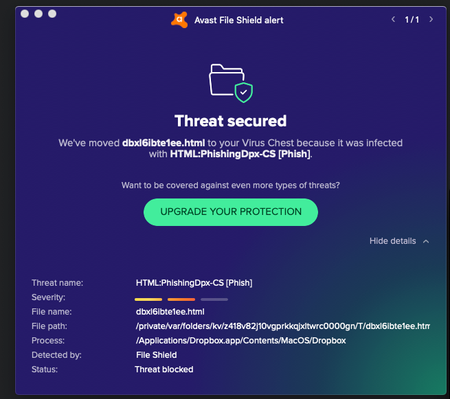
- 6 years ago
Hey again Debby M., thanks for nudging us here.
As Rich mentioned previously, this is a false positive. This can occur when an application is incorrectly flagged as malicious due to an overly broad detection signature or algorithm used in an antivirus software.
In any case, rest assured, the official Dropbox desktop app isn't a phishing attempt and our team is further looking into this matter.
If you have any other concerns, we are always here to assist. Hope this helps to some extent!


flomaka
6 years agoNew member | Level 2
Hi plg, you may find this is sorted now. I've been following this thread since my whole company is having the same problem - all at the same time! Doesn't differentiate between Mac or PC, or what kind of antivirus software - none of us could open the dropbox online from the app without getting a phishing warning. So I just checked and it's back to normal without getting scooped up as a phishing attempt by AVG.
My guess is Dropbox have had a very stressful weekend/Monday scrambling to fix this issue.
plg
6 years agoHelpful | Level 6
>flomaka
Thanks for the tip! The fact that it was not Mac or PC specific confirms that it was a Dropbox issue, probably in the local application, at least if Dropbox was right in telling us that their website was clean... Some update which was compromised somehow, maybe? However, if their local application was compromised, it potentially still is and I don't want to risk reinstalling it if Dropbox does not confirm that the problem is solved —and at this point they won't even confirm that there was a problem. I did send the files to Avast for analysis, and I assume they will check them, so we may have some news from them. Will see! Thanks anyway.
About Apps and Installations
Have a question about a Dropbox app or installation? Reach out to the Dropbox Community and get solutions, help, and advice from members.
The Dropbox Community team is active from Monday to Friday. We try to respond to you as soon as we can, usually within 2 hours.
If you need more help you can view your support options (expected response time for an email or ticket is 24 hours), or contact us on X, Facebook or Instagram.
For more info on available support options for your Dropbox plan, see this article.
If you found the answer to your question in this Community thread, please 'like' the post to say thanks and to let us know it was useful!


