Your workflow is unique 👨💻 - tell us how you use Dropbox here.
Forum Discussion

faustino1
6 years agoExplorer | Level 4
Avast blocks opening Dropbox Web site from the application
When trying to launch the Dropbox Web site, from the icon of the application, Avast blocks it identifying it as phising (see attached image).
It happens also when trying to reach Dropbox from t...
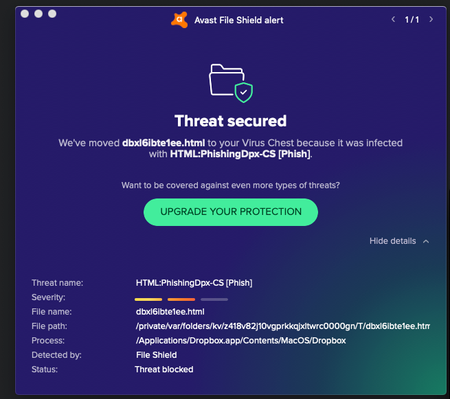
- 6 years ago
Hey again Debby M., thanks for nudging us here.
As Rich mentioned previously, this is a false positive. This can occur when an application is incorrectly flagged as malicious due to an overly broad detection signature or algorithm used in an antivirus software.
In any case, rest assured, the official Dropbox desktop app isn't a phishing attempt and our team is further looking into this matter.
If you have any other concerns, we are always here to assist. Hope this helps to some extent!

Lusil Dropbox Staff
6 years agoDropbox StaffThanks for keeping me in the loop, AtoW. If it does pop up again, just give me a shout. Cheers!

Debby M.
6 years agoCollaborator | Level 10
Last night the problem disappeared as mysteriously as it appeared yesterday.
This was on 2 devices, and I did nothing... no reinstalling Avast, no cache clearing, nothing. There is no way I'm giving anything from Dropbox a carte blanche to get through my AV.
I checked to see if my anti-virus software had updated during that period andit hadn't.
So therefore, logically, it must have been at Dropbox's end. I shall continue to think that until Dropbox come out with a sasatisfactory response to the contrary.
- Lusil6 years ago
Hey again Debby M., thanks for nudging us here.
As Rich mentioned previously, this is a false positive. This can occur when an application is incorrectly flagged as malicious due to an overly broad detection signature or algorithm used in an antivirus software.
In any case, rest assured, the official Dropbox desktop app isn't a phishing attempt and our team is further looking into this matter.
If you have any other concerns, we are always here to assist. Hope this helps to some extent!
 Richard L.656 years agoNew member | Level 2
Same here. Problem disappeared. Because it happened to so many of us, I have a feeling that the dropbox folks released a file that had not been cleared with the antivirus community so it jumped all the alarms.
Problem solved.
Debby M. wrote:Last night the problem disappeared as mysteriously as it appeared yesterday.
This was on 2 devices, and I did nothing... no reinstalling Avast, no cache clearing, nothing. There is no way I'm giving anything from Dropbox a carte blanche to get through my AV.
I checked to see if my anti-virus software had updated during that period andit hadn't.
So therefore, logically, it must have been at Dropbox's end. I shall continue to think that until Dropbox come out with a sasatisfactory response to the contrary. plg6 years agoHelpful | Level 6
Tuesday November 5, 2:55 PM, I just received an e-mail from Avast (I had opened a ticket with them to have them check the various files involved) which confirms that it is indeed a false positive created by the Avast algorithm. The Dropbox app is clean and can be used safely. And we will probably never know whose fault it was, but at least both parties are in agreement!
- Debby M.6 years agoCollaborator | Level 10
Hurrah - thank you plg A definitive answer backed up by fact!
When this was raised on Friday it looked fairly serious and yet Dropbox support took what I would consider to be a relaxed attitude to it. For me - bearing in mind that Dropbox contains some of my most confidential business data in shared client files - I wasn't sure if I was in breach of GDPR if Dropbox had beeen hacked, or what. Meanwhile Avast advised a previous poster that it was malicious (note comment re non-existent support from Dropbox at weekends):
"Their conclusion is that the link Dropbox provides in the app is a malicious link. They assured me that my computer is fine and advised me to contact Dropbox. This is easier said than done. Apparently they do not have phone support - just that ridiculous bot, that did nothing accept arrange for an e-mail contact which could take up to 72 hours. Some customer support!"
So based on what Avast originally said, which wasn't actually correct, and Dropbox's stock phrase ansers reinstall, clear cache and "It's not us, it's them" we- the end user - caught between a rock and a hard place. I suggest that it's time for Dropbox support to get more agile and realise that we live in a 24/7 world and that most business don't shut down for weekend anymore. Would it be too much to ask that Dropbox could speak to Avast/AVG? If my product was being reported as a phishing site - I'd be on the phone to someone!
About Apps and Installations
Have a question about a Dropbox app or installation? Reach out to the Dropbox Community and get solutions, help, and advice from members.
The Dropbox Community team is active from Monday to Friday. We try to respond to you as soon as we can, usually within 2 hours.
If you need more help you can view your support options (expected response time for an email or ticket is 24 hours), or contact us on X, Facebook or Instagram.
For more info on available support options for your Dropbox plan, see this article.
If you found the answer to your question in this Community thread, please 'like' the post to say thanks and to let us know it was useful!


