Your workflow is unique 👨💻 - tell us how you use Dropbox here.
Forum Discussion

Homer
2 years agoHelpful | Level 7
Backup stuck
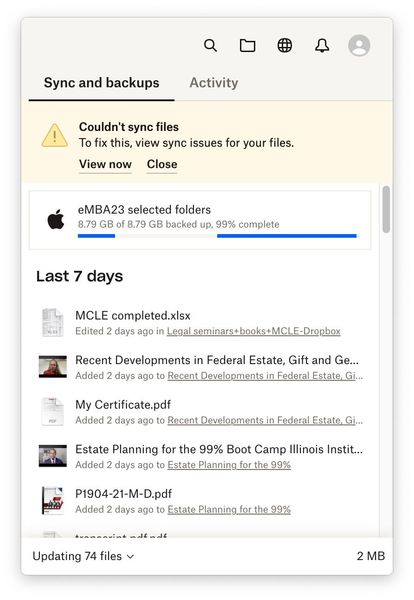
My backup has been stuck at 99% complete for days. How do I get it to complete?

Homer
2 years agoHelpful | Level 7
On Dropbox, I am only using 143.2 GB of 2.01 TB.
On my MacBook, I have 122.46 GB available of 245.11 GB.
I just quit and reinstalled the Dropbox app on my MacBook.
I can't rename the files that are not syncing because they are not on Dropbox.

Megan Dropbox Community Moderator
2 years agoDropbox Community ModeratorHi Homer, happy Monday!
Is the app still stuck syncing the same number of files? Have you made sure the app's bandwidth is set to "No limit"?
I'd also suggest you sign out of the app, then sign back in. Also, if you visit your Backup page online, are you able to see the feature's status there?
- Homer2 years agoHelpful | Level 7
Still stuck at the point when only 74 files are left.
I signed out of the Dropbox Mac app, uninstalled it, reinstalled it, and the backup still freezes at the same point.
As to the Backup page online, I see the Backup there, but I can't tell if it backed up everything or not.
As far as your "Have you made sure the app's bandwidth is set to "No limit"? " instruction, that link sends me to a page in Polish.
- Nancy2 years ago
Homer, feel free to send over a screenshot of your Backups page, and we can check it for you.
I also checked the link Megan sent and it loads alright on my end. Can you please try it again, and let me know if it works now?
- Homer2 years agoHelpful | Level 7
I'm attaching screenshots of my Backup page, and what happens when I check on the "bandwidth" link. However, I did get to the bandwidth page when I used the "it" link in your follow-up email. I went into the Preferences and changed Upload bandwidth to No Limit. We'll see what that does.
But I see another problem. The Dropbox icon in the Mac menu disappears when I am using OneDrive. Isn't it possible to have Dropbox and OneDrive active at the same time?
page

About Apps and Installations
Have a question about a Dropbox app or installation? Reach out to the Dropbox Community and get solutions, help, and advice from members.
The Dropbox Community team is active from Monday to Friday. We try to respond to you as soon as we can, usually within 2 hours.
If you need more help you can view your support options (expected response time for an email or ticket is 24 hours), or contact us on X, Facebook or Instagram.
For more info on available support options for your Dropbox plan, see this article.
If you found the answer to your question in this Community thread, please 'like' the post to say thanks and to let us know it was useful!


