Your workflow is unique 👨💻 - tell us how you use Dropbox here.
Forum Discussion

ab303
2 years agoHelpful | Level 5
CloudStorage Folder on Mac - Duplicate Dropbox Folders
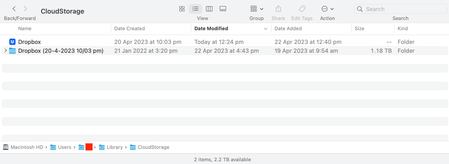
I have recently updated Dropbox to the latest version (v172.4.7555) whereby the location of my Dropbox folder has moved to the 'CloudStorage' folder within Library on Mac OS (Ventura 13.3.1).
F...

jobo49
2 years agoHelpful | Level 5
I have exactly the same problem. Some files are going to the "real" Dropbox, and some to the CloudStorage folder. A mess!

TimReid
2 years agoHelpful | Level 5
Yeah same thing here, this update as caused so much chaos to my workflow. I keep getting scratch disk errors because there's no space, but I don't want to delete this incase I loose data.
- Hannah2 years ago
Dropbox Community Moderator
Sorry to hear about this, TimReid.
Has the migration finished on your computer?
If you hover over the Dropbox icon in your menu bar, what's the sync status and version of the app?
And what's your computer's OS version?
- TimReid2 years agoHelpful | Level 5
Hey Hannah,
Sync status is 'your files are up to date' on both of my two computers. I removed all other linked devices. Both computers are on the latest Mac OS (Ventura 13.4.1)
Do you think I'm free to delete the older copy?
Thanks,
- Nancy2 years ago
Hi Tim! Hope it’s OK to jump in.
If you open the old Dropbox folder that you see, what’s located inside it? Does it have the exact same files as the other folder?


About Apps and Installations
Have a question about a Dropbox app or installation? Reach out to the Dropbox Community and get solutions, help, and advice from members.
The Dropbox Community team is active from Monday to Friday. We try to respond to you as soon as we can, usually within 2 hours.
If you need more help you can view your support options (expected response time for an email or ticket is 24 hours), or contact us on X, Facebook or Instagram.
For more info on available support options for your Dropbox plan, see this article.
If you found the answer to your question in this Community thread, please 'like' the post to say thanks and to let us know it was useful!


