We're making some changes to the Dropbox Community 👩💻 - Find out more here.
Forum Discussion

Beatboxer
8 months agoHelpful | Level 7
Do I have to reinstall Dropbox every time I do a software update on my Linux Fedora 42?
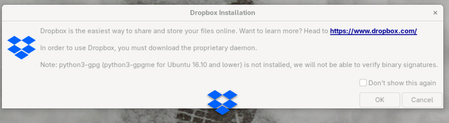
I'm running Dropbox on Fedora 42 (Linux). Each time I do a software update for the computer, this warning shows when I log in:
Do I really have to reinstall Dropbox each time? This is confusing...
 6 months ago
Dropbox is running fine now. I think the answer (or workable workaround) is to click OK on the prompt that comes up (see image at top of thread) or run 'dropbox start -i'.
(I got an email notification that AugustusHarbor posted a useful comment two days ago, but for some reason it's not showing here in the thread....)

Neal Community Manager
7 months agoCommunity ManagerHi Beatboxer,
I just wanted to check in and ask if you see this error on a restart (without performing any updates)?
Beatboxer
7 months agoHelpful | Level 7
It's strange. It doesn't seem to happen on a plain reboot. The other day, after several apps and the system were updated, it wanted me to reinstall the "proprietary daemon." But then this morning there were a few more updates, and Dropbox continued fine after I rebooted.
It seems that certain kinds of updates must overwrite the daemon file while others do not.
This morning it was "System Updates," "Firefox," and "XPS 9315 System Update." Somewere I've got the list I jotted down of the last batch of updates. I can find that if it would help.
Thanks.
Fedora 42 on Dell XPS 9315
- Neal7 months ago
Hi Beatboxer,
Thanks for letting me know! Would it be possible if we could get the contents of ~/.dropbox-dist down to two directory levels? Particularly before and after running dropbox -i and accepting the prompt.
If you have Tree installed you can run:
tree -L 2 ~/.dropbox-dist
About Apps and Installations
Have a question about a Dropbox app or installation? Reach out to the Dropbox Community and get solutions, help, and advice from members.
The Dropbox Community team is active from Monday to Friday. We try to respond to you as soon as we can, usually within 2 hours.
If you need more help you can view your support options (expected response time for an email or ticket is 24 hours), or contact us on X, Facebook or Instagram.
For more info on available support options for your Dropbox plan, see this article.
If you found the answer to your question in this Community thread, please 'like' the post to say thanks and to let us know it was useful!


