We're making some changes to the Dropbox Community 👩💻 - Find out more here.
Forum Discussion

Beatboxer
8 months agoHelpful | Level 7
Do I have to reinstall Dropbox every time I do a software update on my Linux Fedora 42?
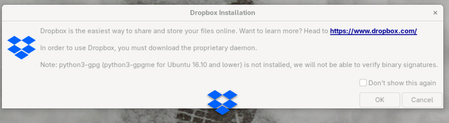
I'm running Dropbox on Fedora 42 (Linux). Each time I do a software update for the computer, this warning shows when I log in:
Do I really have to reinstall Dropbox each time? This is confusing...
 6 months ago
Dropbox is running fine now. I think the answer (or workable workaround) is to click OK on the prompt that comes up (see image at top of thread) or run 'dropbox start -i'.
(I got an email notification that AugustusHarbor posted a useful comment two days ago, but for some reason it's not showing here in the thread....)
Beatboxer
6 months agoHelpful | Level 7
Dropbox is running fine now. I think the answer (or workable workaround) is to click OK on the prompt that comes up (see image at top of thread) or run 'dropbox start -i'.
(I got an email notification that AugustusHarbor posted a useful comment two days ago, but for some reason it's not showing here in the thread....)
- Megan6 months ago
Dropbox Community Moderator
Hey Beatboxer, happy Friday!
Happy to see that your issue is now resolved! In any case, keep an eye on it, and let us know if anything changes.
In regards to the "AugustusHarbor" comment, I searched for the username but couldn't find any active users on our Community with that username.
Lastly, you mentioned a different thread. The only other thread of yours that I could find is this one, which is an older one and the issue has been resolved. Is this not the case? Is it possible that you're talking about a different one?
- Beatboxer6 months agoHelpful | Level 7
I'm referring to the post that Neal Mc said went into spam "as it was about the same issue."
Here's the page I see when I click the link in the "augustus" email I mentioned. The subject line of the email is different than usual: "Subscription Update on The Dropbox Community"
I don't think there any issue, but it is curious.
Thanks to the team for all their support.
- Neal6 months ago
Community Manager
Hi Beatboxer,
I think there's a bit of confusion here (I know I got turned around a good bit trying to figure this out 😅).
So that user replied on this thread but that comment was removed as it was spam. If you look at the end of their comment, they try to post a link for custom home solutions which goes against our community guidelines.In regards to your post that was marked as a duplicate, what I can do is just paste the info you shared here on this thread:
"This information is not required, but it makes it easier for our Community members and support team to help you.Application Affected
dropbox, dropbox-nemo
Device
Dell xps 9315
Operating System/Browser (if using the web)
Fedora 42 and Nemo 6.4.5
Dropbox App Version (if using the app)Dropbox daemon version: 230.4.8797
Dropbox command-line interface version: 2025.05.20Question or Issue
Please describe the problem, in detail. Include what you expected to happen vs. what is happening. Please include any relevant screenshots, error messages or ticket numbers.I'm having trouble figuring out how to install dropbox-nemo. I find what look like downloadable RPMs online, but when I click them, nothing downloads. I've tried using the RPM Fusion repository, but that gives this result:
===
eric@fedora:~$ sudo dnf nemo-dropbox
[sudo] password for eric:
Unknown argument "nemo-dropbox" for command "dnf5". Add "--help" for more information about the arguments.
It could be a command provided by a plugin, try: dnf5 install 'dnf5-command(nemo-dropbox)'
eric@fedora:~$ sudo dnf install nemo-dropbox
Updating and loading repositories:
RPM Fusion for Fedora 42 - Free - Updates 100% | 30.9 KiB/s | 49.9 KiB | 00m02s
RPM Fusion for Fedora 42 - Free 100% | 108.0 KiB/s | 157.7 KiB | 00m01s
Repositories loaded.
Failed to resolve the transaction:
No match for argument: nemo-dropbox
You can try to add to command line:
--skip-unavailable to skip unavailable packages
eric@fedora:~$ sudo dnf install nemo-dropbox-6.4.0-3.fc43.x86_64.rpm
Updating and loading repositories:
Repositories loaded.
Failed to access RPM "nemo-dropbox-6.4.0-3.fc43.x86_64.rpm": No such file or directory
eric@fedora:~$
eric@fedora:~$
eric@fedora:~$
eric@fedora:~$ https://download1.rpmfusion.org/nonfree/fedora/development/rawhide/Everything/x86_64/os/Packages/n/nemo-dropbox-6.4.0-3.fc43.x86_64.rpm
bash: https://download1.rpmfusion.org/nonfree/fedora/development/rawhide/Everything/x86_64/os/Packages/n/nemo-dropbox-6.4.0-3.fc43.x86_64.rpm: No such file or directory
eric@fedora:~$
eric@fedora:~$
eric@fedora:~$ dnf --enablerepo=rpmfusion-nonfree-rawhide install nemo-dropbox
No matching repositories for rpmfusion-nonfree-rawhide. Add "--help" for more information about the arguments.====
FOLLOWING COMMENT ON DUPLICATE POST
Aug 14, 2025 at 7:22 PM
Beatboxer
Re: Trouble installing dropbox-nemo
I succeeded in downloading and tried to runsudo dnf install rpmfusion-nonfree-release-44.noarch.rpm
and got this error:Could not depsolve transaction; 1 problem detected:
Problem: conflicting requests
- nothing provides system-release(44) needed by rpmfusion-nonfree-release-44-0.2.noarch from @commandline


About Apps and Installations
Have a question about a Dropbox app or installation? Reach out to the Dropbox Community and get solutions, help, and advice from members.
The Dropbox Community team is active from Monday to Friday. We try to respond to you as soon as we can, usually within 2 hours.
If you need more help you can view your support options (expected response time for an email or ticket is 24 hours), or contact us on X, Facebook or Instagram.
For more info on available support options for your Dropbox plan, see this article.
If you found the answer to your question in this Community thread, please 'like' the post to say thanks and to let us know it was useful!


