We’re Still Here to Help (Even Over the Holidays!) - find out more here.
Forum Discussion

Naima-Dragon
3 years agoExplorer | Level 4
My Dropbox icon missing from the menu bar, and I can't uninstall the app on my Mac.
Hi community,
All of the sudden, the dropbox icon has disappeared from my mac menu bar. It happened a few weeks ago, but I see that everything would synch up by seeing the green check mark appear. ...
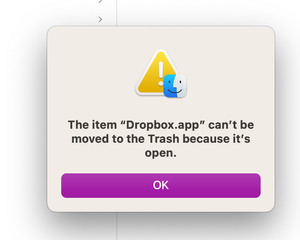
 3 years ago
This was solved by customer support. Thanks!
The solution was to uninstall dropbox and redownload it.
John

SL001
3 years agoExplorer | Level 4
MacOS is Ventura 13.5.2
I don't know how to confirm current Dropbox version, but I deleted and re-downloaded Dropbox today, in an attempt to fix the issue, so I assume that would be the most updated app. Is that not a correct assumption?
During one of those moments when the icon briefly appeared last week in the menu bar, I was able to get info on Dropbox version by clicking on the icon,c and took a screenshot. It was "v184.3.6480", with a tab on the bottom "leave Beta", which I must've signed for before. Again, I a assume that delete/redownload today may have updated or changed that, but not sure how to identify current DB version without access to the icon in the menu bar.

Jay Dropbox Community Moderator
3 years agoDropbox Community ModeratorHi SL001, if you're not on a Dropbox Basic plan with more than 3 devices connected, could you try an advanced reinstall of the app using the steps in this link?
About Apps and Installations
Have a question about a Dropbox app or installation? Reach out to the Dropbox Community and get solutions, help, and advice from members.
The Dropbox Community team is active from Monday to Friday. We try to respond to you as soon as we can, usually within 2 hours.
If you need more help you can view your support options (expected response time for an email or ticket is 24 hours), or contact us on X, Facebook or Instagram.
For more info on available support options for your Dropbox plan, see this article.
If you found the answer to your question in this Community thread, please 'like' the post to say thanks and to let us know it was useful!


