Our Community is in read-only mode until April 8th, learn more here. You can still search existing threads or get help via Dropbox Support, the Dropbox Help Center, or Learn.
Forum Discussion

thelwang
3 years agoHelpful | Level 7
Dropbox iOS app taking up 1.3GB of local app data storage but no offline files?
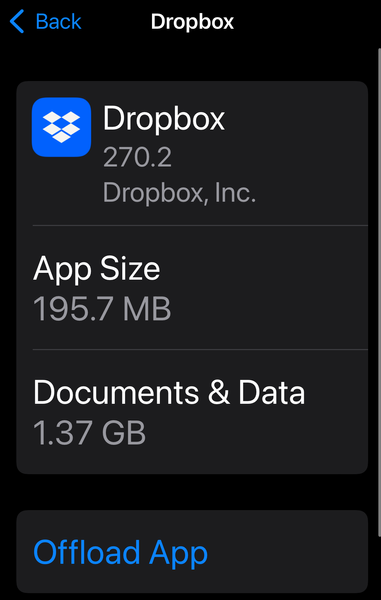
As you can see in the screenshot, the Dropbox iOS app is taking up 1.37GB of space in app storage alone. But I have no offline files.
Things I've done:
Made sure that I have ZERO fi...
- 3 years ago
Thanks for bringing this to our attention, andherand.
From what I understand, it’s the Dropbox cache that keeps taking up space from your device, even after the upload is complete, correct?
In this case, here’s what I’d like you to try as a test; clear the app’s cache via the app settings (just make sure there are no files uploading before that), uninstall the Dropbox app, restart your device and then, reinstall Dropbox.
After that, please try to upload a few files to the app and let me know if you’re still having the same issue.


spiritFed
3 years agoNew member | Level 2
I’m having the same issue in addition to slow uploads from my iPad compared to using a desktop computer. Clearing cache did not work for me either, hoping this is fixed soon. Best

Walter Dropbox Community Moderator
3 years agoDropbox Community ModeratorHi there spiritFed, sorry to hear about this.
Can you please let us know the exact version of your device's OS and the version of the Dropbox app installed there as well?
Apart from clearing the app's cache, have you tried completely uninstalling the Dropbox mobile app from your iPad and reinstalling it anew?
When it comes to the slow uploads issue, have you maybe tried another wifi network or cellular data to see if that makes any difference?


About Apps and Installations
Have a question about a Dropbox app or installation? Reach out to the Dropbox Community and get solutions, help, and advice from members.
The Dropbox Community team is active from Monday to Friday. We try to respond to you as soon as we can, usually within 2 hours.
If you need more help you can view your support options (expected response time for an email or ticket is 24 hours), or contact us on X, Facebook or Instagram.
For more info on available support options for your Dropbox plan, see this article.
If you found the answer to your question in this Community thread, please 'like' the post to say thanks and to let us know it was useful!


