Your workflow is unique 👨💻 - tell us how you use Dropbox here.
Storage space
61 Topics
The Dropbox mobile app is filling up my iPhone storage
I have had a Dropbox Plus account for several years. I have the latest version of the Dropbox app (460.2.2) installed on my iPhone with iOS 18.7.1. When I was unable to upgrade to the latest iOS version and when I could no longer backup my iPhone to iCloud, I found that copying photos and videos from my iPhone camera roll to specific folders in Dropbox, deleting those items from my iPhone camera roll, and then deleting all the items in the Recently Deleted folder in my camera roll did not free up storage on my iPhone. I cleared the Dropbox cache on my iPhone and confirmed that I did not have any offline files. However, I did find that the Dropbox Photos folder on my iPhone had copies of all the uploaded files. Consequently, moving photos and videos to the Dropbox cloud did not free up space on my iPhone. In the iOS Dropbox app, the Photos folder has copies of all the photos that were uploaded to specific folders in the Dropbox cloud. When I delete one of those photos from the Photos folder on the iPhone, the copy in the Dropbox cloud is also deleted! Note that in the iOS Dropbox app, I had "Camera uploads" "On" with the following pertinent settings: "Upload from" "Videos" (only that folder), "Save HEIC photos as" "JPG", "Save Live Photos as" "Live Photo". Though photos should not have been affected, I turned off Camera uploads. I ran the same test with the same result: a photo sent to a specific Dropbox folder appears (in HEIC format) in that Dropbox folder online as well as in the Photos folder in the Dropbox app on my iPhone; deleting the photo from the Photos folder in the iPhone Dropbox app also deletes the photo from the specific Dropbox folder in the cloud. The PictureEcho website recommends using the "Free Up Space" option in the iOS Dropbox app to delete the copies of the photos on the iPhone and not on the Dropbox cloud, but I cannot locate that option anywhere in the Dropbox app on my iPhone. Restarting the Dropbox app does not make a difference. Reinstalling the app including removing all the Dropbox data stored on the iPhone would solve the immediate problem but would not address the bigger issue: as-is Dropbox is only useful for sharing (unannotated) photos and videos that I don't mind also storing on my iPhone. Since I have a backup service for my (Windows) laptop, without a solution I'll go back to moving photos and videos from my iPhone to my laptop. This greatly diminishes the justification for paying for a Dropbox Plus account. The "Free Up Space" option would help but I question the multiple steps required. In iOS select two photos, upload to Dropbox, close the Dropbox upload window, reselect the two photos, delete, open the "Recently deleted" folder (album?) and delete the two photos (or delete all). In the Dropbox app on the iPhone, select "Free Up Space" and then (as needed) delete the cache. Then there's the issue of the comments added to a photo in iOS (apparently) not getting stored in Dropbox. In Dropbox online I can view a photo with the iOS HEIC extension and view the basic HEIC metadata, but I cannot view comments added in iOS. I can add comments in Dropbox but presumably those comments are not visible in iOS (or on my Windows laptop) outside of the Dropbox app or website.109Views0likes10Comments
I can't move my Dropbox files to an external drive
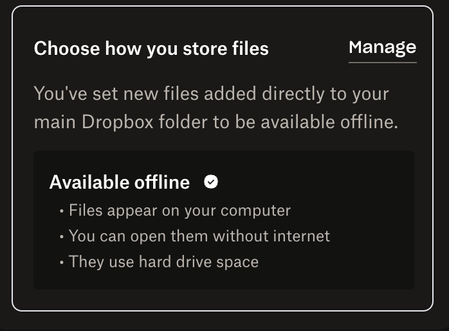
2025 Macbook air m4 Dropbox v240.4.8493 I have 2tb in dropbox and I want it all on an external drive and Dropbox has no way to do this. I tried logging out and changing the storage location - that doesnt work. Every time I switch it and log in dropbox closes because of an error and when I reopen it hasn't switched; the folder remains in "Library." I read that this is mac making things hard for dropbox, so I gave up and tried to work with dropbox's normal functionality. But because I can't sync it all to my 512gb internal drive, I decided to sync individual folders at a time then copy to my external drive. I selected "store offline" in preferences under "choose how you store files." I then chose several folders to sync and left it overnight. It said everything was synced in the morning. I went to those folders in finder and they were still online-only. I right clicked on the folders and selected "make available offline". Dropbox reported that they were synced. The folders have green checks next to them, but NONE OF THE FILES INSIDE ARE SYNCED. Dropbox, this is insane. You need a tool to liberate data. I'm 100% going to lose files over this. I've used dropbox since 2008 and I can't understand how you've managed to make this a worse, unusable experience.172Views0likes4Comments
Hidden Dropbox logs folder is stuck, continually growing bigger, now beyond 300GB
Application Affected (Dropbox app & backup) Device (Optiplex 3060 i5-8500, 16GB RAM, 500GB SSD) Operating System/Browser (if using the web) (Windows 10) Dropbox App Version (if using the app) (236.4.5918) Question or Issue For the past few days, a folder called "log" within the dropbox system folders, specifically "C:\Users\username\AppData\Local\Dropbox\logs" is constantly growing and growing.. occupying my entire hard disk! please help.. Not sure if they're at all related, but the following points have recently changed in this computer: 1. I bought a new SSD for backup purposes, which I have set to backup by Dropbox It's 2TB, 900GB of which are occupied, it's connected over USB and it doesn't seem to actually backup.. 2. I removed Avast and installed Bitdefender instead. I was running Malwarebytes and Spybot in parallel, though these have now been removed. I have noticed that the Tray Assistant almost maxes out my CPU use, as well.. Any ideas of how to troubleshoot/resolve this? Many thanks!Solved1.2KViews3likes35Comments
I keep seeing an unwanted desktop app notification about being over-quota. How can I make it stop?
Application Affected Dropbox for Windows Device Desktop Operating System/Browser (if using the web) Win11 Dropbox App Version (if using the app)Latest Question or Issue Every single day, the Dropbox app has started popping up a notification that my Dropbox is full and wants me to upgrade. I am well aware that my Dropbox is full, and I have no intention of ever upgrading. Please make this popup stop.188Views0likes6Comments
Unable to make files available 'online-only' despite managing disk space
Application Affected Dropbox Device Laptop Operating System/Browser (if using the web) MacOS 14.6 Dropbox App Version (if using the app) 234.4.5591 Question or Issue I am unable to clear my hard drive space from Dropbox files, despite making them available online only. After navigating to the Sync & Storage section and clicking 'Manage Hard Drive Space', I select the files I wish to make available online-only, but Dropbox then syncs for about 1 minute and shows the disk as empty however I open it up again straight away and the disk is full again. I have tried resetting, restarting and clearing cache and none seem to work. Any suggestions? Thanks174Views0likes9Comments
All of my Dropbox files became online-only and I can't move them to another drive.
Dropbox Plan (Plus.) Device (Alienware Aurora. R11) Operating System/Browser (if using the web) (Windows 11,) Dropbox App Version (if using the app): N/A Question or Issue My 2TB data disk (D:) was getting full so I decided to upgrade to a 4TB disk. I seemed simple enough to install the larger disk, copy Dropbox files to it, change the disk letter of the old disk to something else, change the disk letter of the new disk to (D:) and done. However, when I started copying files from the old data disk to the new one, I got an error. It seems that Dropbox, without my knowledge, was trying to make more room on the old data disk, which was almost full, by making random files online only. When it tried to download those files so I could copy them, there was not enough storage space to do that. And so my Dropbox nightmare began. I tried to free up space using the Windows Explorer interface and designating certain folders as online only. I did not use the Preferences method which is accessible through my account. To my dismay, when I woke up the next day, all of my Dropbox files had been deleted from the old data disk. The status on the windows explorer interface showed them cloud icon. I went into the Preferences/Sync menu and none of the selected folders had changed. Dropbox did this on its own. So I’m stuck in a situation where it will take probably weeks to re-download all of the files. This is a disaster. What the hell happened?640Views0likes19Comments"Manage Hard Drive Space" tool is forever loading on Windows.
Device (Desktop PC) Operating System/Browser (if using the web) (Windows 11) Dropbox App Version (if using the app) (230.4.8797) Question or Issue My dropbox drive is nearly full. The Manage Hard Drive Space tool/dialog stays "Loading files on your hard drive..." indefinitely. I've left it open for days at a time and the list never populates. My dropbox drive is a 4tb NVMe156Views0likes2CommentsI need Dropbox files redistributed between two drives, due to the lack of space.
Whatever is you subscription [mine 2Tb] you may think the [File System] in two way: [DISK] I have all my files on MY MAIN PC that are managed to Cloud + other BKP PCs by Dropbox. Only BKP PC get ALL FILES. Not much you change in your way of working with or without Dropbox working, Network available or not. ( at list ... in a temporary range of activities and time) [CLOUD] I have all my files in the Cloud each of my Device decide what to keep on its disk and what not useful. I'm on the first lot: So far one single 1Tb data disk was enough to be managed by Dropbox, I have 3 other for other uses on the MAIN-PC. B U T ... Now I need to add one of them to Dropbox !! Big issue start with big folders and ONLY 1Tb Disks!! It's when you start spanning Folders over different disks!!! To Make It Simple: I cant find a way to ask Dropbox: To get and to Clouds the contents of DiskOne-Business + DiskTwo-Photos ( or the folders from two different drives - and replicate it on the BKP-PC) > being a photographer I need direct access from any devices for both that craps. NOTE: All the old/historical files are moved out !!! ( I do it time by time, moving to 8Tb HDD - HDiskPhoto-History, HDiskBusiness-BKP ) BTW: I discovered another Issues 4 days ago! 'cause NOW I'm running on the BKP-PC. Main-PC Crashed. Everything was fine 'till Dropbox stopped Syncing my files!! "not enough space in your disk!" OK, whattttagattttamalllllow !!!! I looked for a fast solution.... ...while I was fully completely taken in the diagnostics of the main PC not booting W10 anymore... [Update: discovered a crappy USB port went AWOL. Now it must not be used to avoid BSOD) When I will revert to the Main-PC, it will be a double issue on both BKP-PC & Main-PC: I THRUSTED COMPLETELY DROPBOX Instead I will need to add more HDW to do its job ........... UH ?? >while the current 4x 1Tb NVME are perfectly fine for my use, and incorporate a safety path for cache and temporary files 🤬 Should I buy a 4Tb NVME for all my PC??? My laptop has 3x 500Mb ... and now ??? ( to solve it temporarily on the Main-PC > a 2TB Samsung 990 EVO PRO is on the way )711Views0likes16CommentsOnline-only not working in Surface Pro 11 (Snapdragon version)
Recently I went back to Dropbox having read that it now works with Snapdragon Windows versions, but currently I have a significant issue. I cannot have any online-only file in my SP11, thus I cannot have all Dropbox files in my device. I have this in the main DP screen: Then I go to "Manage hard disk space", select folders and make online-only. In less than a second I get the message they are online-only, but they aren't. Any idea how to solve this? Thanks in advance.Solved1.4KViews2likes23CommentsDropbox uses a ton of hard drive space despite most files being online only
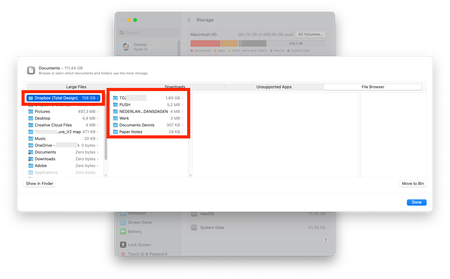
So, I've put ALL my files on online-only because my Mac was running out of space. In my Mac settings, Dropbox takes up 108 GB currently. Once I actually look at what folders are taking up space it's less than 2 GB (you can see in the screenshot what I mean). What is taking up all this space?Solved18KViews4likes53Comments