We’re Still Here to Help (Even Over the Holidays!) - find out more here.
Storage space
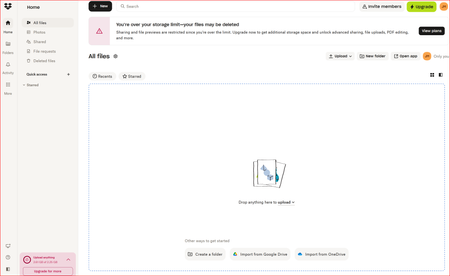
1726 TopicsWhy did I receive an email that my files will be deleted?
Dropbox Advanced Plan (Unlimited) Question or Issue Hello Dropbox Community and Support Team, I am writing this post out of genuine concern and urgency, hoping someone from Dropbox can provide clarity, accountability, and a viable resolution. I was a long-time user of the Dropbox Advanced plan, back when it offered unlimited storage. At the very beginning of my Dropbox journey, I asked Dropbox Support one very specific and critical question: If I use Dropbox for years and end up storing a large amount of data (for example, 50TB), and later decide to stop my paid plan, what happens to my data? Will it be deleted, or will it remain safe on my account? I was clearly told by Dropbox Support that: All the data I had already uploaded would remain permanently on my account My data would not be deleted as long as my account remained active The only limitation would be that I would not be able to upload any new data This was a fair and reasonable policy, and it was a major factor in my long-term trust in Dropbox. Discontinuation of Unlimited Plan & Reconfirmation from Support When Dropbox discontinued the unlimited storage plan and moved to per-terabyte pricing, the cost became completely impractical for a personal user with ~50TB of data. Before making any decision, I again reached out to Dropbox Support to reconfirm what would happen if I chose not to continue with an active paid plan. Once again, I was explicitly told: My existing data would remain safe My data would not be deleted As long as my account stayed active, Dropbox would retain my files This was escalated and reconfirmed by higher-level support in March 2024. Sudden and Alarming Deletion Notice Now, completely out of the blue, I received a notification stating that: My data will be deleted by January 30, 2026 I am required to reduce my account usage to under 2GB This is extremely alarming and directly contradicts multiple written assurances I received from Dropbox Support over the years. My Concerns How is this allowed? This is the exact scenario I proactively asked about—multiple times—and was clearly assured would neverhappen. How am I supposed to download 50TB of data? Even with fast internet, downloading this volume of data within a limited time window is unrealistic, costly, and technically challenging. Why is Dropbox not standing by its own commitments? Trust was built on explicit support assurances. Changing this retrospectively puts long-term users at severe risk. What I Am Asking For A formal clarification from Dropbox on why previous commitments are no longer being honored An exception, grandfathering, or alternative solution for legacy unlimited-plan users like myself At the very least, a realistic and humane transition path that does not put decades of work and data at risk This situation is extremely stressful and disappointing for someone who trusted Dropbox for years as a long-term data archival solution. I sincerely hope someone from Dropbox can step in, review my case, and provide a fair resolution. Thank you for taking the time to read this. I look forward to a response. — A long-time Dropbox user and supporter41Views0likes0CommentsHidden Dropbox logs folder is stuck, continually growing bigger, now beyond 300GB
Application Affected (Dropbox app & backup) Device (Optiplex 3060 i5-8500, 16GB RAM, 500GB SSD) Operating System/Browser (if using the web) (Windows 10) Dropbox App Version (if using the app) (236.4.5918) Question or Issue For the past few days, a folder called "log" within the dropbox system folders, specifically "C:\Users\username\AppData\Local\Dropbox\logs" is constantly growing and growing.. occupying my entire hard disk! please help.. Not sure if they're at all related, but the following points have recently changed in this computer: 1. I bought a new SSD for backup purposes, which I have set to backup by Dropbox It's 2TB, 900GB of which are occupied, it's connected over USB and it doesn't seem to actually backup.. 2. I removed Avast and installed Bitdefender instead. I was running Malwarebytes and Spybot in parallel, though these have now been removed. I have noticed that the Tray Assistant almost maxes out my CPU use, as well.. Any ideas of how to troubleshoot/resolve this? Many thanks!630Views1like27CommentsI'm concerned about what will happen to my files after downgrading my account
Hello Dropbox Community Team, I’m writing to raise a serious concern regarding a written assurance from Dropbox support that now appears to be contradicted. At the time of using Dropbox, a Dropbox support assistant confirmed via email that I had unlimited storage for life, and that even if I changed plans in the future, my existing files would never be deleted. Over time, the cost of the newer plans became ridiculously expensive and simply not affordable for me. However, based on Dropbox’s assurance, I believed that at the very least, my existing files would remain safely stored on the platform, even if I could not continue on an upgraded plan. I’m now facing a situation where: My plan has shifted from unlimited to limited storage I’m receiving warnings about storage limits My files are being deleted or are at serious risk of deletion This directly contradicts the written assurance provided by Dropbox support and puts important personal and professional data at risk. I’m not asking for additional storage or new benefits — only that the files already uploaded under the original promise remain intact, as explicitly communicated by Dropbox. I respectfully request: Immediate protection or restoration of my existing files A clear explanation for why the earlier assurance is no longer being honored A fair resolution that respects the commitment made by Dropbox support I would appreciate this being reviewed and escalated by a Dropbox moderator or support representative. Thank you for your time and understanding. Chirag50Views2likes1CommentWhy am I being prompted to upgrade to see my files due to my account being full?
Hello everyone. I'm trying to check for an old document that is important to me, regarding my education at university. I remembered I had used Dropbox for quite a long time, but now when I go to check the contents, I am unable to see my files without paying for a subscription. The data I have in there is just over 3GB. It used to be that this was well within the free limit, but now they've changed the rules. How can I see my files (which are mine), then remove files above 2GB (by downloading of course) to be able to continue to use the free version of Dropbox? Cheers S2.7KViews1like8CommentsThe System Data on my macOS computer shows 7.9TB used when it's not
Dropbox Plan Business Standard Device MacBook Pro 14" Nov 2024 Operating System/Browser (if using the web) Mac OS Tahoe 26.0.1 Dropbox App Version (if using the app) 238.4.6075 Question or Issue I bought this Macbook in August 2025. I spec'ed it with 8TB SSD because I travel a lot and often don't have reliable internet access. System Storage looks like this: Note two things: 1) Mac Documents are 3.33TB 2) System Data is 3.96TB But now look at the screen print belowFinder shows a) Dropbox Personal of 911GB, OtRExp Dropbox [company] of 1,590GB, and Movies 832 GB = total of approx 3.33TB which is exactly what's shown in System Storage/Mac Documents = 3.33TB. Also note that System is a 23.78GB, a bit high, but nothing unusual. So far so good. b) But then, back to the first screen print above, on top of that, the System Storage/System Data figure is 3.96TB as shown above. The result being that out of the 8TB my Mac has 7.81TB are used up. There is, it seems, some double counting going on in the Mac OS. I've spent countless hours with Apple so-called "senior" advisors with no resolution at all except for to tell me "Reinstall Dropbox". Sure, I can do this, but a clean re-install means several days of syncing all my Dropbox (Personal and company) data back to my laptop. More than happy to do this if someone here can tell me: yep, that's going solve your problem. Very grateful to anyone who can shed led on how to solve this problem. At the moment, I feel like having wasted a huge amount of money on SSD of which 1/2 is "missing". Cheers,61Views0likes6CommentsMy account shows 2000% usage when I don't have any files
My dropbox Basic account shows over 2000% all files storage usage. All files, backups and deleted files are empty (expent 700 MB file). I believe there are orphaned / hidden computer backups on my account. Can a Dropbox staff member please remove them? Thanks!59Views0likes3CommentsWarning - Long-Term Dropbox Unlimited Customers: Retained Legacy Storage Can Be Removed
I’m posting this as a warning to other long-term Dropbox business users, particularly anyone who originally had Unlimited storage and was later migrated to a paid tier with retained legacy storage. This is not a rant. It’s a factual account of what happened to me, so others can assess their own risk. Background I was a long-standing Dropbox Business customer on an Unlimited plan. When Dropbox discontinued Unlimited, I was explicitly told that: My existing storage usage would be retained My account would continue functioning as before My monthly cost would increase to reflect the new structure My price went from roughly £70/month to £154+/month, which I accepted in order to keep my storage and business workflows intact. Over time, I built my business around this arrangement and stored ~56TB of client data, some of which I am legally required to retain. What went wrong Recently, my bank temporarily declined a payment after flagging Dropbox as a potential fraud risk. This caused a brief, unintentional billing interruption. Important points: I did not cancel my plan I did not request a downgrade I updated my payment method as soon as I became aware However, during that short interruption: My account was downgraded When I re-upgraded, I was placed onto the current Dropbox Advanced plan My previously retained legacy storage was permanently removed My account now shows a 30TB limit, despite already having ~56TB stored. Dropbox’s position (in their own words) Support confirmed the following: I was notified that my account would be downgraded I was not notified that retained legacy storage would be permanently lost Once downgraded, legacy storage “no longer exists” and cannot be restored There is “no room for escalation” because the features are no longer offered The only option is to pay substantially more for additional licences or storage add-ons In short: A temporary billing issue permanently removed storage that I had already been paying a higher monthly fee to retain. Why this matters to other users If you: Ever had Unlimited Dropbox Were told you could retain your existing storage Are now paying more under a newer plan Store large volumes of business or client data Then your storage is not safe in the way you may assume. Based on my experience: A billing interruption (even involuntary) Can trigger a downgrade Which can permanently remove retained storage With no restoration, review, or escalation available Even if you immediately fix the payment issue. Key takeaway This isn’t about asking for free storage or legacy features. It’s about undisclosed consequences: Being warned about a downgrade is not the same as being warned that previously retained storage will be permanently forfeited Especially when customers have already accepted significant price increases to keep that storage If you rely on Dropbox for large-scale storage, I strongly recommend: Keeping multiple backup copies Reviewing your exact contractual position Understanding that “retained” storage may not survive plan interruptions Why I’m posting this I’m sharing this so other users: Aren’t blindsided the way I was Can make informed decisions Can assess whether Dropbox is still safe as long-term business infrastructure If you’re in a similar position, I’d genuinely like to hear your experience.85Views1like5CommentsDo we all need to upgrade to have access to the space when using a shared folder?
The board of my housing cooperative (which I am a member of) is currently using a Dropbox Basic plan for our documents. We're nearing the 2GB limit. I think one of us created an account using the cooperative e-mail and invited the members to the folder where we store the documents My question is, is it sufficient to upgrade the owner's account to Plus. Or do every user need to upgrade our plans to Plus? Reason why I'm asking is that all members now receive the warning that space is running out, even though the files are not in our accounts (just shared with us).33Views0likes1CommentReferral ineligible for no apparent reason
Dropbox Plan Basic Device Operating System/Browser (if using the web) Windows 11 Dropbox App Version (if using the app) 238.4.6075 Question or Issue I sent referral invitations to friends and colleagues, three of them registered and installed the app. I'm sure that at least two of them did it on computers where Dropbox had never been installed(the other is not sure) and with new email addresses, but I did not receive the 500 MB for any of the three, and the status of all of them is "ineligible". I read all the conditions for receiving the bonus and they have all been met, so I don't see why I wasn't given it.57Views0likes8Comments