Our Community is in read-only mode until April 8th, learn more here. You can still search existing threads or get help via Dropbox Support, the Dropbox Help Center, or Learn.
Forum Discussion

donawalt
2 years agoCollaborator | Level 9
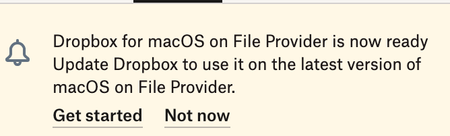
Dropbox keeps asking me to install the MacOS for File Provider update, but it's already installed
This thing just runs in a cycle! I get a notice that it's available, so I start - it seems like it does a partial reinstall - asks me the re-log in - re-verify folders I am syncing - it says it is mo...

donawalt
2 years agoCollaborator | Level 9
Nancy you asked me to let you know on this thread if Dropbox started asking again - it's come back
I just said Not Now as I am busy in a project, if it comes back I'll close Dropbox and restart the computer again.
But why does it keep asking me this - I verified the dropbox folder is under the CloudStorage folder as it should be now???

Megan Dropbox Community Moderator
2 years agoDropbox Community ModeratorHi donawalt, sorry to see you're still going through this.
When did this start happening, and which version of our app do you use at the moment?
- donawalt2 years agoCollaborator | Level 9
It originally started about 4-6 weeks ago, as you can see in the thread it was in a constant cycle. Megan Once I closed dropbox and restarted my mac, it had not happened for about 4 weeks since yesterday. Yesterday as I said, I just said "not right now" and it has not come back. Even though, the dropbox folder is in the proper place now for the MacOS for File Provider Update, the folder CloudStorage. I should be on the latest Mac version, v195.4.4995 it says...
- Megan2 years ago
Hey donawalt, thanks for clarifying!
Would you mind sending me some screenshots of the syncing icons of files, inside your Dropbox folder, please?
I'd like to check, and also have a visual on my end too.
- donawalt2 years agoCollaborator | Level 9
Not sure what you mean - there are no sync icons, as everything is sync'd - ie there is no little cloud showing or anything. As I show here, Dropbox says everything is up to date.
About Apps and Installations
Have a question about a Dropbox app or installation? Reach out to the Dropbox Community and get solutions, help, and advice from members.
The Dropbox Community team is active from Monday to Friday. We try to respond to you as soon as we can, usually within 2 hours.
If you need more help you can view your support options (expected response time for an email or ticket is 24 hours), or contact us on X, Facebook or Instagram.
For more info on available support options for your Dropbox plan, see this article.
If you found the answer to your question in this Community thread, please 'like' the post to say thanks and to let us know it was useful!


