Our Community is in read-only mode until April 8th, learn more here. You can still search existing threads or get help via Dropbox Support, the Dropbox Help Center, or Learn.
Forum Discussion

donawalt
2 years agoCollaborator | Level 9
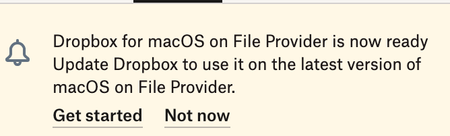
Dropbox keeps asking me to install the MacOS for File Provider update, but it's already installed
This thing just runs in a cycle! I get a notice that it's available, so I start - it seems like it does a partial reinstall - asks me the re-log in - re-verify folders I am syncing - it says it is mo...

donawalt
2 years agoCollaborator | Level 9
It's there - it's just faint for some reason. This photo shows it's in CloudStorage where it should be. Maximize the pic and you can see the Dropbox icon clearly.

Jay Dropbox Community Moderator
2 years agoDropbox Community ModeratorThanks for the screenshot, I'd recommend contacting the support team directly for them to investigate this further.
About Apps and Installations
Have a question about a Dropbox app or installation? Reach out to the Dropbox Community and get solutions, help, and advice from members.
The Dropbox Community team is active from Monday to Friday. We try to respond to you as soon as we can, usually within 2 hours.
If you need more help you can view your support options (expected response time for an email or ticket is 24 hours), or contact us on X, Facebook or Instagram.
For more info on available support options for your Dropbox plan, see this article.
If you found the answer to your question in this Community thread, please 'like' the post to say thanks and to let us know it was useful!


