Your workflow is unique 👨💻 - tell us how you use Dropbox here.
Forum Discussion

Sneijder
7 years agoHelpful | Level 5
Dropbox Link stays in windows explorer after uninstall
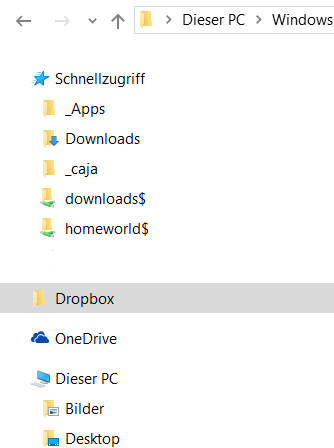
I uninstalled Dropbox, but the Explorer still has the dropbox link. Tried uninstalling via Programs and Features and via the uninstaller. Machine has been rebootet. How can I get rid of it?
 7 years ago
Unfortunately that won't help. I already did delete the folder and reboot my machine. The link stayed.
My solution was to crawl the registry for {E31EA727-12ED-4702-820C-4B6445F28E1A} and set System.IsPinnedToNamespaceTree to 0 in every instance. If I remember correctly there were 3 entries with ID. After a reboot the Icon is now gone.

anarfox
6 years agoHelpful | Level 6
I had the same issue and went through the registry looking for {E31EA727-12ED-4702-820C-4B6445F28E1A} but it didn't help. Turns out there's another key to look for: {E31EA727-12ED-4702-820C-4B6445F28E1B}.
I won't list all the places I found it on beacuse it was litered all over the registry (like 20+ locations), but fixing this key as well resolved the issue for me.
Dropbox, you really need to look over your uinstaller. Littering the registry with keys and leaving them there during an uninstall isn't good practie. Not to mention all the junk files I had to manually delete from all the appdata folders.
Floffy
6 years agoNew member | Level 2
It shouldn't be difficult for Dropbox to add some options so that we can choose which uninstall to perform:
- Repair Dropbox (Reinstall and fix common issues)
- Full uninstall (Delete everything related to the application itsef)
- Delete the Dropbox folder ?
3 simple options which can definitely make everyone happy!
About Apps and Installations
Have a question about a Dropbox app or installation? Reach out to the Dropbox Community and get solutions, help, and advice from members.
The Dropbox Community team is active from Monday to Friday. We try to respond to you as soon as we can, usually within 2 hours.
If you need more help you can view your support options (expected response time for an email or ticket is 24 hours), or contact us on X, Facebook or Instagram.
For more info on available support options for your Dropbox plan, see this article.
If you found the answer to your question in this Community thread, please 'like' the post to say thanks and to let us know it was useful!


