Our Community is in read-only mode until April 8th, learn more here. You can still search existing threads or get help via Dropbox Support, the Dropbox Help Center, or Learn.
Forum Discussion

plutogenie
1 year agoHelpful | Level 5
Dropbox not recognizing external drive or showing sync icons
Hi Everyone,
I signed up for a 30 day Dropbox Plus trial. I already had Dropbox Desktop App (version 207.4.5821) installed on my Win Acer Nitro laptop on the C: drive with a Dropbox folder sync...

plutogenie
1 year agoHelpful | Level 5
Here is some additional information. I can still see the SSD icon under the Backup tab as below:
When I click on the SSD, it opens up the Manage Backups box, which looks like the image above which does not have the SSD shown, so I can't manage it.
At the bottom it is showing that there is still updating going on. This updating can only relate to the SSD backup because under "Activity" it shows that all files in the Dropbox folder have already been synced. So it appears there is a mismatch between the updating and the status above that the backup has been completed.
I have tried Quiting from the Dropbox App and restarting it, but this does not fix the sync icon issue (as Dropbox help says it should), nor fix the SSD missing issue.
- plutogenie1 year agoHelpful | Level 5
A further update.
I tried another reboot of the laptop, and the SSD has now reappeared under the "Add backups" within Preferences -> Manage Backups, as below. I will monitor to see if it disappears again like it did after my last reboot. But the sync icons are still not showing up.
- Hannah1 year ago
Dropbox Community Moderator
Hey plutogenie, thanks for reaching out to the Dropbox Community.
Before anything, I would actually suggest allowing the application to finish syncing and doing any updates it needs to do.
You can confirm this, by hovering over the Dropbox icon in your system tray; does it show that it's "up to date" now?
Also, if you go to your backups page online, do you see the external drive?
Let me know and we'll go from there.
- plutogenie1 year agoHelpful | Level 5
Hi Hannah
Yes, the Dropbox icon is saying everything is 'Up to date'. The external drive appears in the 'backups page' link, and is still appearing under Preferences -> Manage Backups section of the Dropbox client app on the laptop.
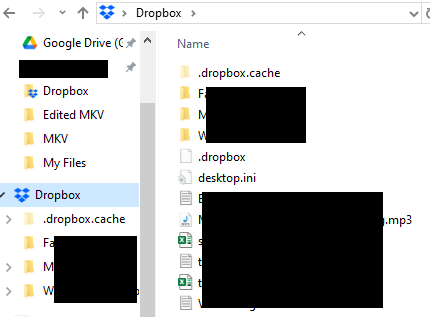
However, the first problem I mentioned above, which I thought was related to the external drive issue, is still occurring. That is, the sync icons in the Dropbox folder under File Explorer are still missing.
If I right-click on a folder or file, the Dropbox options are listed (e.g. Copy Dropbox link, Share, Transfer a copy, etc), and the files/folders are syncing with my online account.
But Dropbox will be pretty much useless to me without the sync icons appearing (like the do with OneDrive, Google Drive, etc) in File Explorer so I know the status of each file/folder. It is not acceptable to have to right-click everything to see if the option is 'Make available offline' or 'Make online-only' to determine the status of the file.
Should I reinstall Dropbox? As I said above, the Dropbox Help solution of quitting and restarting Dropbox did not fix the issue, and Dropbox Help offered no other possible causes.
Thank you,
Plutogenie

About Apps and Installations
Have a question about a Dropbox app or installation? Reach out to the Dropbox Community and get solutions, help, and advice from members.
The Dropbox Community team is active from Monday to Friday. We try to respond to you as soon as we can, usually within 2 hours.
If you need more help you can view your support options (expected response time for an email or ticket is 24 hours), or contact us on X, Facebook or Instagram.
For more info on available support options for your Dropbox plan, see this article.
If you found the answer to your question in this Community thread, please 'like' the post to say thanks and to let us know it was useful!


