Our Community is in read-only mode until April 8th, learn more here. You can still search existing threads or get help via Dropbox Support, the Dropbox Help Center, or Learn.
Dropbox Plus
57 Topics
"Updating 42 files" on Dropbox icon for over a year and two Dropbox folders in Library
Application Affected Dropbox Mac: Device MiniMacM4, 2024 Operating System/Browser (if using the web) MacOS 26.3.4 Dropbox App Version (if using the app) 244.4.6580 Question or Issue I’ve had the same “Updating 42 files” on my monitor tab icon for over a year. after syncing new addition, it reverts to this notice. There is nowhere I can find what or where these 42 files are to be found. With the disaster of the mixed main filer location since it was moved into the Library, where I now have two folders residing, Things are getting more complicated and less reliable, a situation that seems to go hand in hand everywhere I encounter ‘more complicated.’ In Preferences>Sync>Dropbox folder updates “You are using Dropbox on File Provider. To opt out ... 1st question: how to get rid of “Updating 42 files 2nd question; how to have a single Library folder? Do I have to compare the two folders, file at a time? Cuz that would be a real PIA and I could lose data as several people in this forum have already experienced. files copied with zero info. 3rd question. Does anybody try these new systems out in real world situations? Jay [removed per the Community Guidelines], Kenwood CA45Views0likes1CommentNeed all my files accessible locally. On my machine there's no option to "Make Available Offline."
Honestly, this seemingly late "bringing to the forefront" (I guess you'd call it) of the whole "Online Only" vs. "Make Available Offline" thing has been more of a headache than a help, if I may offer my opinion. I purchased a new ultra-portable Windows computer which has a 256GB SSD on board, but I plan on using my Dropbox files with it, and I have well over 256GB worth of stuff in my Dropbox. The thing is that I'm often in situations in which I need offline access to my files. So I purchased a 1 TB microSD card, which will never leave its slot in this machine. Heck, I can't even retrieve it, it seems. I mounted it so that it isn't considered "Removable Media" by the computer, and then I proceeded to install Dropbox on the computer, with the intent of using the 1 TB card exclusively for Dropbox content...offline. I left my machine to sync overnight, and what do you know? Everything has a stupid cloud next to it. I have no option to "Make Available Offline," either in the file/folder context menu or in the Dropbox application > Preferences > Sync menu. If this is by design, it's a pitifully stupid design. I'm going to whatever lengths I can to make this work the way I envision, but I'm going to be awfully disappointed if Dropbox doesn't respect use cases that might not necessarily conform to a narrow definition. If it's an issue with a recent update to the application, then please bug the developers posthaste.Solved26KViews1like125Comments
Dropbox update has caused Windows File Explorer to slow so badly I cannot work
Ever since this update was forced upon us, my File Explorer no longer works properly. It takes forever to load with a green bar at the top and white icons. When it does finally load, if I click on a file to either open it or copy it or whatever, I get the blue donut and nothing happens for ages. I have to go away and do something else for 5 or 10 minutes before it will finally allow me to right-click or open it. I am beyond frustrated now. It took me over an hour to complete a simple copy and paste task this morning that would normally take less than 5 minutes. I simply cannot run my business this way. I've tried various things such as the obvious rebooting etc. I also tried to rename the Shell Icon Overlays as there is apparently a limit in Windows and Dropbox was apparently causing an overlay limit conflict. I also cleared my thumbnail/icon cache. Nothing I do is working. It's awful and I hate the change. I just want it to work. File Explorer isn't great at the best of times as it's so unreliable and I've always had to restart it 2 or 3 times a day. But now it's not working for me at all. Please can someone help? I am incredibly busy at work and have now wasted a good 4 hours on this. I really desperately need to get on with my work. I'm using Windows 10 Pro and it's up to date.1.2KViews5likes12CommentsMac Finder extension incompatible with Google Drive Finder helper Finder extension
I have the same issue that many other people have reported. On my MacBook Pro running MacOS 14.1.2, I have both Dropbox v189.4..8395 Personal Plus (I have never had a beta version) and Google Drive File Stream v85.0.26.0. My Dropbox sync/cloud icons are missing from my Dropbox folder. If I uncheck the Google Drive Finder helper's Finder extension, then the Dropbox sync icons immediately re-appear. However, this reduces the functionality of my Google Drive installation. I need *both* of these cloud sync systems to work. Is there a fix for this problem yet? -Marc Levoy, Stanford University and Adobe Inc.2.5KViews0likes7CommentsDropbox not recognizing external drive or showing sync icons
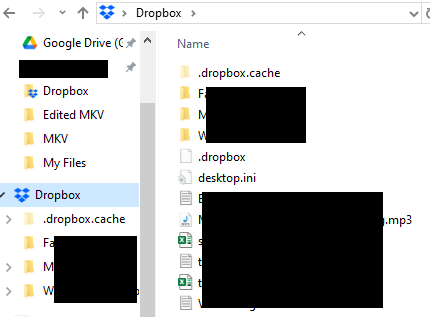
Hi Everyone, I signed up for a 30 day Dropbox Plus trial. I already had Dropbox Desktop App (version 207.4.5821) installed on my Win Acer Nitro laptop on the C: drive with a Dropbox folder syncing with my online Dropbox account while on the Basic plan. The files in the Dropbox folder are still syncing fine with my online account. I am not sure if the two problems are related, so I thought I should mention both in the one post. The first problem is the sync icons are missing in the Dropbox folder on the PC. I don't recall if they were visible under the Basic plan on this PC because I access Dropbox folder via my iPhone and Surface laptop instead, where the icons are visible on the latter. On my Acer I only access Dropbox files via links pinned to Word, Excel, etc so I never went into the Dropbox folder. See the following image: The second problem is that I'm trying to use Dropbox Plus to backup (not sync) data on an external SSD, but Dropbox is not recognising/finding/seeing the SSD. This is what has happened, and what I've tried, so far: The SSD was already connected to the computer as a D drive. All other applications can access it, write to it, etc. It shows up in File Explorer. The SSD is NTFS format (which Dropbox help says is compatible), and is a Sandisk Portable Extreme connected to a USB-C port on my laptop. Once I started the trial, I went into the Dropbox Desktop App to find the SSD (under Preferences -> Manage Backups) to select folders to backup, but I could only see the PC (C:) under "Add a backup". See below: I shutdown the laptop, disconnected the SSD, restarted the laptop and reinserted the SSD. Dropbox popped up with the notification asking if I want to backup the drive, and I selected Yes. I was then able to select the test folder I wanted to backup. The SSD showed up under "Add backup" when I went into Preferences -> Manage Backups, so I thought all was good. Dropbox did nothing with the folder for about two hours. Under the "Backup" tab when you click on Dropbox in the taskbar, it kept saying 0% backed up and no activity showed at all. (I don't have an image of this.) When I went into Preferences -> Manage Backups again, I noticed that the SSD had disappeared again from under the "Add backup". Suddenly the backup started, but the SSD is still not shown. It is the same as the above image, as though the SSD is no longer visible to Dropbox. These problems with Dropbox do not fill me with much confidence about paying for a plan if these basic aspects don't work reliably. What should I do next to try to fix the problem? Should I uninstall Dropbox completely from the Acer, reinstall? I know this will delete the Dropbox folder on my Acer (I have a local backup and can copy the files back to reduce download time) and I will need to set up the SSD backup again. If I do that, will I need to delete the original SSD backup in the online Dropbox account and start again? Do the sync icon and SSD issues together suggest that my installation of Dropbox might be corrupted somehow, and that is why there are so many problems? There are no problems with the SSD itself. As I say above, it works fine with all other applications. It is only Dropbox which cannot recognise/see it. Many thanks for your help and suggestions. Plutogenie1.4KViews0likes8CommentsDropbox Not working after restart: Reconnecting to the internet. This may take a moment.
I have been experiencing a very frustrating issue with Dropbox the past few days. Issue: After restarting my Mac Studio (MacOS 13.6.5), Dropbox always gets stuck with the message: Reconnecting to the internet. This may take a moment. No VPN No Firewall Home Network Fully updated Dropbox The thing that is baffling is that : If you Quit and restart Dropbox it works immediately but if you restart the computer the issue appears again If you wait for a long time Dropbox eventually connects and syncs. But it takes a long time On the same computer, about a week ago, Dropbox was syncing instantly after reboot. I have tried already reinstalling and deleting the cache folder. Is this a known issue that's going on at the moment> Many thanksSolved31KViews13likes120Comments
Dropbox File Provider does not work with Mac Sonoma. Syncing is stuck for hours.
Macbook Pro running Sonoma 14.4.1 - Dropbox 197.4.7629 First off, Lightroom was struggling to "see" files being stored online-only, which Dropbox had aggressively moved online without my awareness. Hoping to deal with this I made a bunch of folders offline accessible, and then updated to File Provider. Since then it's been 2-3 days of absolute annoyance and lost productivity. After a massive indexing, Dropbox got hung up "Updating" about 150 files. Hoping to stop this, I restarted the software. It started indexing again and left it alone. I came back to my hard drive nearly full and syncing paused due to that full hard drive. Restarted Dropbox, same issue. At this point, chatted with Dropbox and was told to let it index and if it got stuck again, I'd need to Selective Sync. Left it overnight, in the morning it was still indexing, 700 mb of hard drive space. Sync suspended due to no space. Had to Selective Sync. That's where I'm at now, with the majority of my files no longer synced to my laptop but just online, removed through Selective Sync. Not what I want at all. Dropbox still stuck "Updating 159 files" and I'm trying to figure out how to add files back to my hard drive without going through this all again. Dropbox: why not warn users that EVERY FILE on Dropbox will need to be indexed to the hard drive, and if there is not enough hard drive space, don't update to File Provider! Obviously it doesn't work as it has currently been released. I've tried to follow up with my Ticket #23683048 this morning but hours later, no reply. This has tanked my entire work week.1.4KViews0likes8Comments
Dropbox menu bar icon keeps moving to the left after shutdown
The Dropbox icon on my Mac suddenly started moving from its original position in my menu bar all the way to the left (as I like to customize the order of the icons for efficiency... ) I move it back using the CMD key to re-order the menu bar icons, but every time I shut down or restart, it moves back to the end of the line of icons... Before: Dropbox Icon near the middle After Shutdown/Restart: (moves to the left???) Can someone please help me out? Before you ask, I have fully updated all the apps and the software Device: MacBook Pro (Retina, 13-inch, Early 2015) OS: macOS Monterey 12.71.6KViews2likes5Comments