Our Community is in read-only mode until April 8th, learn more here. You can still search existing threads or get help via Dropbox Support, the Dropbox Help Center, or Learn.
Dropbox Plus
297 Topics
"Updating 42 files" on Dropbox icon for over a year and two Dropbox folders in Library
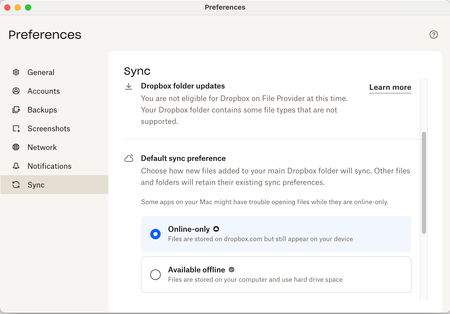
Application Affected Dropbox Mac: Device MiniMacM4, 2024 Operating System/Browser (if using the web) MacOS 26.3.4 Dropbox App Version (if using the app) 244.4.6580 Question or Issue I’ve had the same “Updating 42 files” on my monitor tab icon for over a year. after syncing new addition, it reverts to this notice. There is nowhere I can find what or where these 42 files are to be found. With the disaster of the mixed main filer location since it was moved into the Library, where I now have two folders residing, Things are getting more complicated and less reliable, a situation that seems to go hand in hand everywhere I encounter ‘more complicated.’ In Preferences>Sync>Dropbox folder updates “You are using Dropbox on File Provider. To opt out ... 1st question: how to get rid of “Updating 42 files 2nd question; how to have a single Library folder? Do I have to compare the two folders, file at a time? Cuz that would be a real PIA and I could lose data as several people in this forum have already experienced. files copied with zero info. 3rd question. Does anybody try these new systems out in real world situations? Jay [removed per the Community Guidelines], Kenwood CA41Views0likes1Comment
Will my Dropbox account get downgraded immediately, if I cancel my yearly plan now?
Dropbox Plan Plus Payment Method card How did you upgrade? website Question or Issue My annual plan ends in 2 months. If I cancel my plan now do I lose access to my PLUS account immediately? It says my files will be deleted but it does not say when.60Views0likes3Comments
Questions about shared folders, storage space and permissions
Hi all, After cleaning up all the mess in my Dropbox account I would like you to comment on two questions I have: As an example. .I have a folder A, and a lot of subfolders within that folder, called 1, 2, 3 etc. In the subfolder A1 there are a few subfolders, called, A1a, A1b etc. I want to share the subfolders A1a, A1b etc. The person I want to share folders with has a free Dropbox account (2 GB). I give them permission for A1a. So the person opens Dropbox goes into my account until the level of A1, finds the subfolder A1a, opens that and does what this person wants to do. As long as the folder A1a is smaller than 2GB that's okay for this person to do. After editing files within A1a, the folder may be closed and removed from the free Dropbox account. In this way this person has always 2GB available. One or more shared folders may not exceed 2GB. Is this a way to use Dropbox and shared folders? A shared folder can be opened by another person as long as necessary until I remove the permission, right? Thanks in advance and with kindest regards, Leo.Solved95Views0likes2CommentsTell Us How You Use Dropbox
No two people use Dropbox in exactly the same way. Some of you rely on it every day for work, others for school, creative projects, or keeping life organized - and we love that. We’d love to hear how you’re using Dropbox today - is it something you use once in a while, is it part of your day to day, are there any features you can’t live without? What workflows have you built that save time or reduce friction? And where do you see opportunities for us to do better? Your tips, ideas, and honest feedback really help us to make sure we can share useful tips, and they help other community members discover new ways to get more out of Dropbox too. Share your experience, favorite features, or suggestions in the comments below. Your voice truly helps shape the future of the Dropbox community 😁 The Dropbox Community Team3.9KViews4likes14Comments
I paid for an upgrade to 2TB (with 3 months extra), but nothing has happened.
Dropbox Plan Plus with 3 months extra! Payment Method IDEAL How did you upgrade? Through the UPGRADE button Question or Issue 28-02-2026 Dropbox iDEAL | Wero -119,88 Omschrijving: [redacted] 7180125967132235 revenue api transaction id 6fa1a829 IBAN: [removed per Community Guidelines] Kenmerk: 28-02-2026 21:52 7180125967132235 Valutadatum: 28-02-202669Views0likes2CommentsFiles are zero bytes on Dropbox on File Provider
I'm on a Mac with OS Sequoia, running Dropbox Plus, version 242.4.5815. My Dropbox folder location is on my internal hard drive. I've set Default sync preference to online-only since our business had files too numerous to store on my 500 GB internal drive. I have reinstalled the Dropbox app this morning and restarted my computer to try to fix these issues, to no avail. In my Mac Finder, many files are showing as zero bytes. This creates problems with InDesign not seeing linked files. If I double click the zero-byte files and then close them, this activates them somehow, and then InDesign can see them and their true size shows in Finder. How can I make these files available automatically without having to open each one? There are way too many to open each one like this. Additionally, the Dropbox quick action menu is missing when I right click a Finder file. It used to be available. How do I restore this functionality? Why is my system not eligible for Dropbox on File Provider? Is this the source of the problem? Thanks for your help. ReginaSolved239Views0likes11CommentsDropbox Plus Plan but can't access email support
Dropbox Plan Plus Payment Method Card How did you upgrade? Don't remember Question or Issue I want to email a question to support as the chatbot isn't able to resolve my issue. When I go to http://www.dropbox.com/get_help,it says my support options include email, but I only have access to the chatbot. It's the exact same issue as the thread below and I have tried all the suggestions in the thread below. https://www.dropboxforum.com/discussions/101001018/i-cannot-access-email-support-with-my-paid-plus-account/853500/replies/853585189Views1like9Comments
How to remove linked debit / credit card from my Dropbox account?
Dropbox Plan (Plus) Payment Method (Debit Card) Can you please help to unlink / unsubcribe / remove card details from my dropbox plus account. I previously paid yearly for Dropbox Plus Account and now I do not want to have this subscription. I tried in the BILLING SECTION but there's no way to delete the card details. I hope I can get your kind assistance and response.191Views0likes5Comments