Our Community is in read-only mode until April 8th, learn more here. You can still search existing threads or get help via Dropbox Support, the Dropbox Help Center, or Learn.
Forum Discussion

Jharn
3 years agoHelpful | Level 5
Dropbox preventing GPU to switch display mode
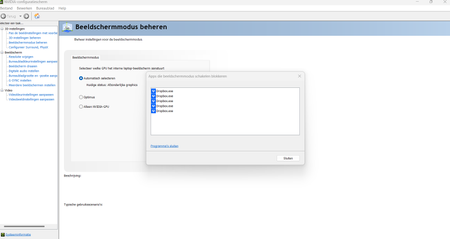
Hello I have a gaming laptop with a discrete RTX 3070 GPU. Nvidia control center manages the switching of the display to the integrated or the discrete GPU, depending on the needs. It should sw...
 2 years ago
Hi Everybody,
We have implemented a hardware acceleration toggle, and we would love if anyone experiencing this could test it out to make sure it solves the problem.
Affected users on Mac can option + click on the tray icon and disable hardware acceleration from the drop down menu.
Affected users on Windows can ctrl + click on the tray icon and disable hardware acceleration from the drop down menu.
Let us know if this works!
Regards,
Ben

seanature
3 years agoHelpful | Level 5
Yea, doesn't look like they're actually concerned about fixing this issue. I never even got any email with any ticket number etc. Pointless place to come for help, other than the clues from other users. Same stuff, different bottle...

kokuryuha
3 years agoHelpful | Level 6
Agreed, and I'm pretty positive that is probably some prettying effect in the menu that prevents the driver from switching. I've been exploring other avenues since dropbox doesn't seem to be willing to fix this. It's not the only app that causes the problem, but it's the only one I need to keep running to have stuff synced.
- BenDBX3 years ago
Community Manager
Hi Everybody,
I have spoken with our team about this issue. We are looking into the nature of the error messages. I am curious about one user's experience on this thread:
"I ignored the 'failed to change display mode' message and loaded into my game, and I found that the game used the Nvidia GPU instead of the iGPU. It seems that the error is a non-issue."
Has anyone else determined if your integrated GPU is actually in use while gaming, or if the error message is erroneous and GPU does switch properly? Regardless, we understand that receiving the error message is not ideal. To further assist, we would like to understand if there actually is an underlying GPU switching error for some of our users, or if the problem is the error message itself.
Regards,
Ben
 Mfor183 years agoNew member | Level 2My GPU is actually not switching. It isn’t just an error message.
- kokuryuha3 years agoHelpful | Level 6
Hi BenDBX ,
To clarify, it's entirely possible to ignore the warning, and yes, the dGPU(Nvidia) still does process the 3D graphics, however, the delve deeper, here's the explanation of what the issue is:
Nvidia laptops with a tech called Advanced Optimus use what's called a Mux switch that basically switches connection to the display between the iGPU and the dGPU. It's entirely possible for the dGPU to do the processing and pass the frames through the iGPU buffer, which is how it worked before, but the direct connection (and display switch) is how the dGPU is able to directly control the display with other technology like Nvidia GSYNC (VRR) and such. Preventing this switch prevents this from happening. You know when it occurs when the computer makes a "device connected" sound and the display switches briefly. It can also be noted in the Nvidia control panel when it switches properly, as the entirety of the option set becomes available.
I've only found 3 applications that prevent this from switching: Dropbox, Windows Phone Link, and Intel Arc Control center.
 zky3 years agoNew member | Level 2
Same issue happening to me. Latest drivers. Dropbox v170.4.5895
- BenDBX2 years ago
Hi Everybody,
For anyone still having this issue, try updating your GPU drivers and motherboard firmware to the latest versions. If this does not fix the issue, reply here and I will pass that information onto the appropriate team for further investigation.
Regards,
Ben
- kokuryuha2 years agoHelpful | Level 6
Don't know who fixed what, but I randomly started up a 3D app tonight without exiting Dropbox like I have been doing, and my Lenovo laptop switched display modes on it's own, even with the app running.
Dropbox 175.4.5569
Nvidia Driver 535.98
- BenDBX2 years ago
Hi Everybody,
We have implemented a hardware acceleration toggle, and we would love if anyone experiencing this could test it out to make sure it solves the problem.
Affected users on Mac can option + click on the tray icon and disable hardware acceleration from the drop down menu.
Affected users on Windows can ctrl + click on the tray icon and disable hardware acceleration from the drop down menu.
Let us know if this works!
Regards,
Ben
- kokuryuha2 years agoHelpful | Level 6
I can report that with the previously mentioned Nvidia driver and Dropbox version that I don't even need to toggle the disable on the acceleration and programmatically, whatever was done has fixed the issue for me. I did attempt to toggle it both on and off and tested just to see, but it seems to work now without needing it.
 Firsto2 years agoHelpful | Level 5
It's finally fixed, after so many months of discussion )
- jeromebayawa2 years agoExplorer | Level 3
What does hardware acceleration do? Trying to figure out if this is the cause for dropbox taking up so much memory on a macbook m1.
- Walter2 years ago
Dropbox Community Moderator
Hey jeromebayawa - thanks for joining the discussion here.
While it's not my area of expertise, hardware acceleration is a process where applications offload certain tasks to hardware in your system. You can search the web for more information.
As for the issue you mentioned about high memory consumption, are you referring to your computer's hard drive space or the CPU or RAM used when the Dropbox desktop app is running?
- jeromebayawa2 years agoExplorer | Level 3
Thank you for your reply.
I did try to search on the use of dropbox hardware acceleration but could not get any useful results. This thread was one of the results that came up. I can understand the need for hardware acceleration on games or on apps like photoshop/illustrator but could not understand why dropbox needs hardware acceleration to sync files?
As for my system memory, If I'm working on multiple designs for clients and saving files in dropbox, it tends to use so much memory. sometimes up to 8GB of system memory or more. I usually have to close dropbox and restart it which becomes annoying if you do it 2 to 3 times in a day.
I am running an m1 14 inch macbook pro with 16gb memory so it tends to eat up most of my memory from time to time.
- Megan2 years ago
Hi jeromebayawa, have you taken a look at this Help Center article for possible reasons why this might be happening and how to tackle it?
Could you also confirm the Dropbox version you're using on your end, please? You can find this by hovering your mouse over the little Dropbox icon, next to your WiFi on the menu bar.
If you could also share the processor that you're using, and the total amount of RAM on your machine, that'd be amazing.
Keep me posted, and we'll take it from there!


About Apps and Installations
Have a question about a Dropbox app or installation? Reach out to the Dropbox Community and get solutions, help, and advice from members.
The Dropbox Community team is active from Monday to Friday. We try to respond to you as soon as we can, usually within 2 hours.
If you need more help you can view your support options (expected response time for an email or ticket is 24 hours), or contact us on X, Facebook or Instagram.
For more info on available support options for your Dropbox plan, see this article.
If you found the answer to your question in this Community thread, please 'like' the post to say thanks and to let us know it was useful!


