Your workflow is unique 👨💻 - tell us how you use Dropbox here.
Forum Discussion

witsend
6 years agoHelpful | Level 5
Dropbox stopped working on Ubuntu 18.04 LTS; advanced re-install did not help
Hi, I have been using DB for years; these days, I use it to sync files across 3 computers; all of them with a different version of Ubuntu Linux. On two of these computers, DB works great. However, o...
- 6 years ago
Hi twometers,
If you can't open Dropbox's site then the application can't be able to link any account and the problem isn't in Dropbox application, definitely, neither Ubuntu (not as a system, but can be some settings). Can you access some other (non company, external) site? You have to solve the network problem initially (wherever it is).
Hope this gives some direction. :wink:


Fiona Dropbox Staff
6 years agoDropbox StaffI emailed you witsend! Thank you for your time on this.
Also please take a look at Здравко's suggestion here and add any results here if you wish. This will be a great help for other users reading the thread.
Talk to you soon via email! :envelope:

corktowner
6 years agoExplorer | Level 3
I have been Dropbox for years on Ubuntu however I cannot get the client to run on my system anymore. I have attached the terminal output when attempting to start Dropbox.
- corktowner6 years agoExplorer | Level 3
apt-get install libatomic1
Worked for Ubuntu 18.04.
- Здравко6 years agoLegendary | Level 20
corktowner wrote:... I have attached the terminal output when attempting to start Dropbox.
??? Where? :thinking:
corktowner wrote:apt-get install libatomic1
Worked for Ubuntu 18.04.
And... What exactly is the problem? :nerd:
... Ok. Great, i.e. you don't have any problems.
- easternseaboard6 years agoNew member | Level 2
I can only speak to my situation, and I can only characterize it in non-technical and possibly incorrect nomenclature, but hopefully you will get the point.
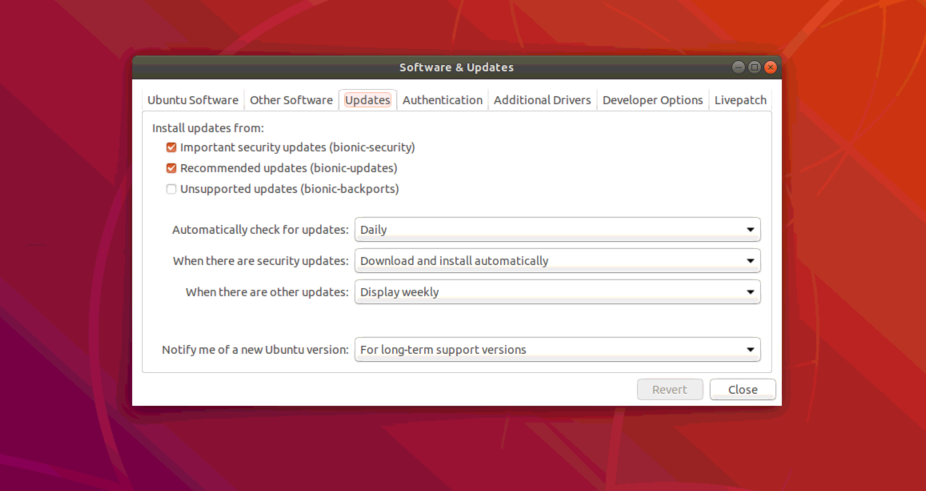
I have always had all possible automatic updates disabled in Ubuntu 18. Apparently Dropbox does not respect the "no updating" policies I have set in the Ubuntu OS, and Dropbox tried updating itself recently. As it did so, it tried pulling thrings from repositories that it could not reach since I had disabled updating at the OS level. This caused dropbox to "break". It sat with the spinning arrows and says "upgrading" for days on end. Sometimes it would sync files and othertimes not.
However, the fix for me was to 1) reenable updates at the OS level, then 2) launch a terminal window and type "sudo apt-get install libatomic1" without quotes. Kick it through the prompts and then reboot. After rebooting, dropbox succeeded in updating itself and began syncing properly again. Prior to this fix my dropbox version was 70.4.93 and afterward it was 85.4.155.
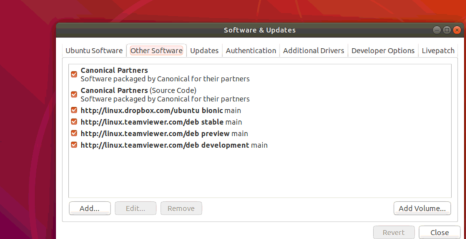
Here are the update settings that I re-enabled before running the terminal commands. Apparently in order to pull the libatomic1 files, these update settings must be turned on. After dropbox fixed itself, I turned all of these update settings back off.

About Apps and Installations
Have a question about a Dropbox app or installation? Reach out to the Dropbox Community and get solutions, help, and advice from members.
The Dropbox Community team is active from Monday to Friday. We try to respond to you as soon as we can, usually within 2 hours.
If you need more help you can view your support options (expected response time for an email or ticket is 24 hours), or contact us on X, Facebook or Instagram.
For more info on available support options for your Dropbox plan, see this article.
If you found the answer to your question in this Community thread, please 'like' the post to say thanks and to let us know it was useful!


