Our Community is in read-only mode until April 8th, learn more here. You can still search existing threads or get help via Dropbox Support, the Dropbox Help Center, or Learn.
Forum Discussion

TimDb
4 years agoHelpful | Level 6
Dropbox wont appear after install (Windows 11)
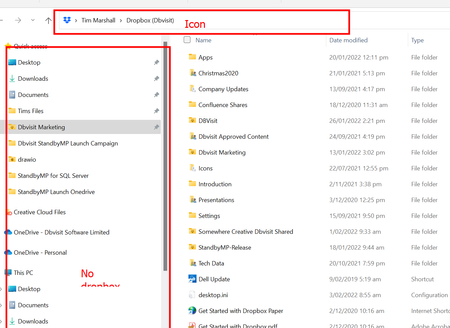
Situation: After re-intallation and advanced re-installation of dropbox I am unable start the program. Dropbox application appears and task manager but there is no folder in Windows Explorer, and n...
 4 years ago
This was resolved by Dropbox support.
* It was determined that the installation had not been completing correctly / fully.
* Creation of a new windows user profile and reinstallation resolved the issue. Likely a setting / corruption was causing dropbox to not be able to be installed correctly.
* Its a fairly simple process of copying over any files from your other user profile to the new user profile in windows.

TomPr
3 years agoNew member | Level 2
This is beyond frustrating. The program will not launch. I cannot uninstall it and reinstall. It is like purgatory. What is the simple solution?


About Apps and Installations
Have a question about a Dropbox app or installation? Reach out to the Dropbox Community and get solutions, help, and advice from members.
The Dropbox Community team is active from Monday to Friday. We try to respond to you as soon as we can, usually within 2 hours.
If you need more help you can view your support options (expected response time for an email or ticket is 24 hours), or contact us on X, Facebook or Instagram.
For more info on available support options for your Dropbox plan, see this article.
If you found the answer to your question in this Community thread, please 'like' the post to say thanks and to let us know it was useful!


