Our Community is in read-only mode until April 8th, learn more here. You can still search existing threads or get help via Dropbox Support, the Dropbox Help Center, or Learn.
Forum Discussion

kulath
6 months agoExplorer | Level 3
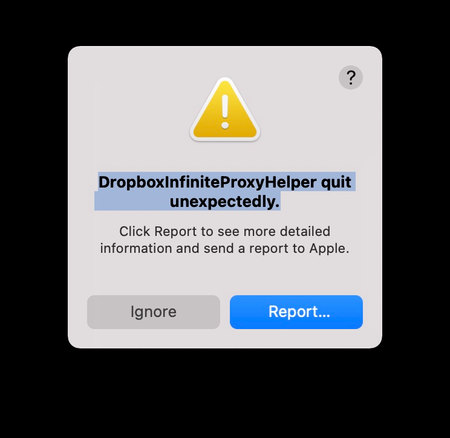
DropboxInfiniteProxyHelper quit unexpectedly. How can I resolve this?
Starting Dropbox (which happens automatically when I logon gives the error
DropboxInfiniteProxyHelper quit unexpectedly.
This seems to be due to an invalid code signature. See the trace bel...

kulath1
6 months agoNew member | Level 2
Hi Walter , I am actually kulath, but I have had to login with a different name, because when I try to access https://www.dropboxforum.com/, using my kulath account I get "We're sorry, but you have been banned from using this site.". I still seem to be able to access the main Dropbox site, and my account details and content there; it is just the forum that I seem to have been banned from.
Could you please unban the kulath account from the forum.
I have tried the advanced instal, but it makes no difference, I still get the error. I checked the certificate, and it seems OK:
$ codesign --display --verbose=4 /Applications/Dropbox.app/Contents/XPCServices/DropboxInfiniteProxyHelper.xpc/Contents/MacOS/DropboxInfiniteProxyHelper
Executable=/Applications/Dropbox.app/Contents/XPCServices/DropboxInfiniteProxyHelper.xpc/Contents/MacOS/DropboxInfiniteProxyHelper
Identifier=com.getdropbox.dropbox.InfiniteProxyHelper
Format=bundle with Mach-O thin (x86_64)
CodeDirectory v=20500 size=534 flags=0x10000(runtime) hashes=7+5 location=embedded
VersionPlatform=1
VersionMin=720896
VersionSDK=984064
Hash type=sha256 size=32
CandidateCDHash sha1=be02b1df540e52746a9531ed43da50f17f9c15b2
CandidateCDHashFull sha1=be02b1df540e52746a9531ed43da50f17f9c15b2
CandidateCDHash sha256=82010fdcaeb6d16f8717056f434e168dc07eb223
CandidateCDHashFull sha256=82010fdcaeb6d16f8717056f434e168dc07eb22360731edffa35e43ddebfe587
Hash choices=sha1,sha256
CMSDigest=fc32cad0b2173c47a989ffd8fcff2679886a90f2c631692fa77099704737236b
CMSDigestType=2
Page size=4096
CDHash=82010fdcaeb6d16f8717056f434e168dc07eb223
Signature size=9148
Authority=Developer ID Application: Dropbox, Inc. (G7HH3F8CAK)
Authority=Developer ID Certification Authority
Authority=Apple Root CA
Timestamp=9 Sep 2025 at 12:23:11
Info.plist entries=21
TeamIdentifier=G7HH3F8CAK
Runtime Version=15.4.0
Sealed Resources version=2 rules=13 files=1
Internal requirements count=1 size=204
$ codesign --verify --verbose /Applications/Dropbox.app/Contents/XPCServices/DropboxInfiniteProxyHelper.xpc/Contents/MacOS/DropboxInfiniteProxyHelper
/Applications/Dropbox.app/Contents/XPCServices/DropboxInfiniteProxyHelper.xpc/Contents/MacOS/DropboxInfiniteProxyHelper: valid on disk
/Applications/Dropbox.app/Contents/XPCServices/DropboxInfiniteProxyHelper.xpc/Contents/MacOS/DropboxInfiniteProxyHelper: satisfies its Designated Requirement
Step 3 of the advanced reinstall says; "When the uninstall finishes, restart your computer.", but this doesn't make much sense, because the only step advised is to move the application to the trash, which happens instantaneously. Was this step intended for when there was an uninstall inside the package, as there is for some applications.
Thanks, would be very grateful for an email contact.

Megan Dropbox Community Moderator
6 months agoDropbox Community ModeratorHey kulath1, thanks for letting us know about that!
I was able to successfully unban your account. I sincerely apologize for that, it seems it was a Community moderator error that we managed to fix.
As for your problem that still persists, I'd be happy to create an email on my end for you. Just let me know which Community-linked email address you'd like for me to use.
Is it the one under the kulath1 username, or the one under kulath?

About Apps and Installations
Have a question about a Dropbox app or installation? Reach out to the Dropbox Community and get solutions, help, and advice from members.
The Dropbox Community team is active from Monday to Friday. We try to respond to you as soon as we can, usually within 2 hours.
If you need more help you can view your support options (expected response time for an email or ticket is 24 hours), or contact us on X, Facebook or Instagram.
For more info on available support options for your Dropbox plan, see this article.
If you found the answer to your question in this Community thread, please 'like' the post to say thanks and to let us know it was useful!


