We’re Still Here to Help (Even Over the Holidays!) - find out more here.
Forum Discussion

Josh L.20
8 years agoCollaborator | Level 10
Four services in Windows? (Five w/ Dbxsvc.exe)
Wht are there now FOUR services running for Dropbox in Windows?
Dropbox used to be only a single service, and now it's up to four (5 with Dbxsvc).
This is beginning to become nonsense.
...
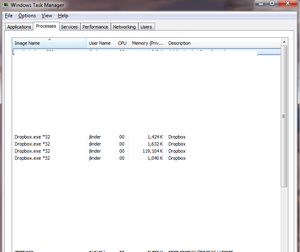
 8 years agoHi there, they should use minimal resources.
Amongst the processes you'll see:
- One, the one using decent resources, is our application.
- We'll run a updater process, it's separate and will ensure, if a critical issue occurs we can separately update the app back into a working state. It'll also independently pull down any updates.
- One will be a crash logger, it'll up any critical crashes to us, so we have logging incase an issue occurs. (if the app is in a non-functioning state we wouldn't have confidence it would up any exceptions it hit).
Hope this helps you.

Saturn
9 years agoHelpful | Level 7
Bump.
Anyone anything? DbxSvc keeps getting re-enabled after each and every update, the other trash remains dormant, though.

eugeneteo
9 years agoNew member | Level 2
It is completely beyond me that Dropbox thinks they should have TWO scheduled tasks set to run EVERY HOUR for 24 HOURS. You are wasting my resources.
What is more Dropbox doesn't care to address this question posted months and months ago.
Dropbox has become a big fat bloatware. Avoid!
- Saturn9 years agoHelpful | Level 7
True, they're becoming like Microsoft in this regard - no transparency whatsoever. :/ Well, I still keep those services at bay, and everything works perfectly without them. Also, I've noticed that Dropbox asks for internet access permissions twice AFTER shutting it down (or during the shutdown process), and I've noticed no change whether I allow that or not.
About Apps and Installations
Have a question about a Dropbox app or installation? Reach out to the Dropbox Community and get solutions, help, and advice from members.
The Dropbox Community team is active from Monday to Friday. We try to respond to you as soon as we can, usually within 2 hours.
If you need more help you can view your support options (expected response time for an email or ticket is 24 hours), or contact us on X, Facebook or Instagram.
For more info on available support options for your Dropbox plan, see this article.
If you found the answer to your question in this Community thread, please 'like' the post to say thanks and to let us know it was useful!


