We’re Still Here to Help (Even Over the Holidays!) - find out more here.
Forum Discussion

stang92x
6 months agoHelpful | Level 6
Green or blue icons on my files after uninstalling the Dropbox desktop app on Windows
Hello!
I just uninstalled dropbox on one of my computers and something really bad happened!
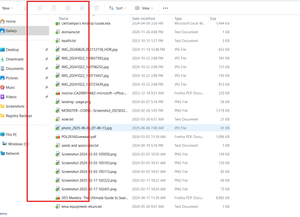
Now all of my files on my computer have a green box with a white checkmark or a blue box and 2 arrows p...
 6 months ago
I figured it out!
It was a norton backup feature!
I totally forgot about it!
Thanks all for your help!
stang92x
6 months agoHelpful | Level 6
Yes it might be onedrive... I have tried everything
I am also talking to windows about this [can you look over?]: https://answers.microsoft.com/en-us/windows/forum/windows_11-wintop_apps-win_subtopwinapps/uninstall-dropbox-problem/0b8747cc-b1ea-4170-948b-662bf3efcb4b?messageId=e60904bd-a7d4-4deb-b9e6-c6aa0954dc5d
stang92x
6 months agoHelpful | Level 6
I just tried to uninstall onedrive then restart and still there
Also, currently have the norton backup activated as well... it might be that!
About Apps and Installations
Have a question about a Dropbox app or installation? Reach out to the Dropbox Community and get solutions, help, and advice from members.
The Dropbox Community team is active from Monday to Friday. We try to respond to you as soon as we can, usually within 2 hours.
If you need more help you can view your support options (expected response time for an email or ticket is 24 hours), or contact us on X, Facebook or Instagram.
For more info on available support options for your Dropbox plan, see this article.
If you found the answer to your question in this Community thread, please 'like' the post to say thanks and to let us know it was useful!


