We’re Still Here to Help (Even Over the Holidays!) - find out more here.
Forum Discussion

stang92x
6 months agoHelpful | Level 6
Green or blue icons on my files after uninstalling the Dropbox desktop app on Windows
Hello!
I just uninstalled dropbox on one of my computers and something really bad happened!
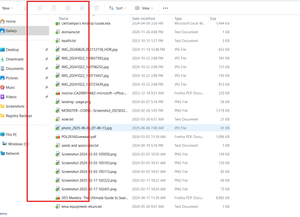
Now all of my files on my computer have a green box with a white checkmark or a blue box and 2 arrows p...
 6 months ago
I figured it out!
It was a norton backup feature!
I totally forgot about it!
Thanks all for your help!

Rich Super User II
6 months agoSuper User IIstang92x wrote:Now all of my files on my computer have a green box with a white checkmark or a blue box and 2 arrows pointing right in the bottom left corner.
As Walter mentioned, those icons aren't from Dropbox. Here's what I suspect is happening ...
Windows only allows so many icon overlays, 15 to be exact, and 4 of those are reserved by for use by Windows. That leaves a maximum of 11 overlays that can be visible, and Dropbox uses many of those. With the many sync applications in use these days, conflicts tend to occur. You install OneDrive, Git, or any other sync application and they register a whole bunch of icon overlays. Next you install Dropbox and it registers it's own icon overlays. Since Dropbox was installed last, those are the overlays that you see on your files.
Now you decide that you no longer need Dropbox installed. You uninstall it and Dropbox unregisters the overlays that it registered previously. That moves the overlays from your other applications back up to the top of the list, causing them to be displayed after Dropbox is removed.
So, Dropbox isn't causing those icons to appear on your files. Dropbox is only removing its own icons from your system, and another application has moved up in the order and is now able to display its own icons.
stang92x
6 months agoHelpful | Level 6
I figured it out!
It was a norton backup feature!
I totally forgot about it!
Thanks all for your help!
- Theresa6 months ago
Community Manager
Hi there stang92x and welcome back to the Dropbox Community. I’m really glad to hear everything’s sorted with syncing your files and thank you for coming back to share your update. It’s always so helpful for others to learn from these experiences!
I’m Theresa 👩💻, one of the Community Managers here in the forum. I love jumping into conversations like this or kicking off new ones throughout the community. Now that you’ve uninstalled the app, I’m curious... do you still use Dropbox through the web, or do you have a favourite feature you’re hanging onto?
Looking forward to hearing from you,
T😸 (Dropbox Community Manager)
- stang92x6 months agoHelpful | Level 6
I will still use the dropbox on the web and on other computers.
And my favorite feature is how everyhing is so smooth [uploading, downloading and organizing] considering how much code is involved

About Apps and Installations
Have a question about a Dropbox app or installation? Reach out to the Dropbox Community and get solutions, help, and advice from members.
The Dropbox Community team is active from Monday to Friday. We try to respond to you as soon as we can, usually within 2 hours.
If you need more help you can view your support options (expected response time for an email or ticket is 24 hours), or contact us on X, Facebook or Instagram.
For more info on available support options for your Dropbox plan, see this article.
If you found the answer to your question in this Community thread, please 'like' the post to say thanks and to let us know it was useful!


